

 Part 4 - Loops, Conditions, and Inline ABAP
Use
eCATT allows looping and conditional processing. You can also include ABAP instructions within inline ABAP blocks. Inline ABAP allows you to access the power of the ABAP language from within the eCATT environment.
Prerequisites
You have completed part 3 of this tutorial.
Procedure
Looping
DO ( 3 ).
REF ( XYZ_FK01 , XYZ_FK01_1 ).
ENDDO.
REF ( XYZ_FK02 , XYZ_FK02_1 ).
 , to check the script.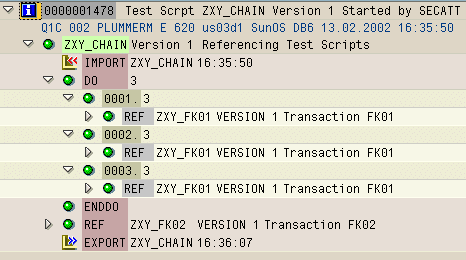
You have created three new records in table LFA1.
Conditional Processing
Within a DO...ENDDO loop you can use the EXIT keyword to define a condition which, if satisfied, causes the loop to be exited.
EXIT ( &LPC = 3 ).
&LPC is an eCATT variable. It is the loop counter.
The DO loop now only creates two new records. When the EXIT condition is false, it is marked by  in the log, and when it is true, it is marked by
  .
.

You can use the IF...ELSEIF...ELSE...ENDIF keywords to perform conditional branching. In this example, you will cause the first record created in the loop to be modified. The other records will be left unchanged.
Edit the test script so that the REF command to call the second script (
XYZ_FK02) is on the line after the IF command. Your test script should look like this:DO ( 3 ).
EXIT ( &LPC = 3 ).
REF ( XYZ_FK01 , XYZ_FK01_1 ).
IF ( &LPC = 1 ).
REF ( XYZ_FK02 , XYZ_FK02_1 ).
ELSE.
ENDIF.
ENDDO.

When the IF condition is false, it is marked by in the log, and when it is true, it is marked by .
Inline ABAP

Statements inside an ABAP...ENDABAP block are not checked when you choose .
You cannot use eCATT statements inside inline ABAP. You can assign values to and from eCATT local variables. In this example, you use ABAP to read a record from a table, and assign the contents of a field of that record to a local variable.
ABAP.
DATA wa_lfa1 TYPE lfa1.
SELECT SINGLE * FROM lfa1 INTO wa_lfa1.
NAME = wa_lfa1-NAME1.
ENDABAP.
LOG ( NAME ).
Inline ABAP blocks are independent of each other. You can test this by adding the following code to your test script:
ABAP.
Data new_name(128) type c value 'test'.
* new_name = wa_lfa1-NAME1.
Name = new_name.
ENDABAP.
LOG ( NAME ).
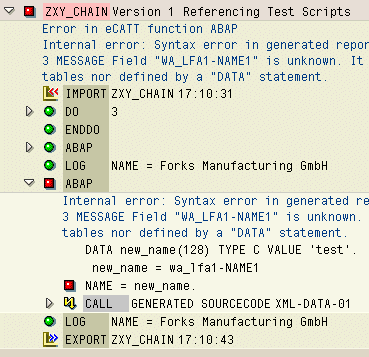
An asterisk at the beginning of a line denotes a comment line. The line is displayed in blue in the command editor. Comment lines are never executed, but they are recorded in the log. Try executing the test script with and without the asterisk.

The script generates an error in the second case.
Summary
A false condition does not cause an error.
You can pass local variables to and from inline ABAP.
Inline ABAP blocks are independent of each other.