

 Editing Variation Ranges in Report Writer
Use
You can edit variations of Report Writer reports in two ways:
Procedure
 Variation and make your changes.
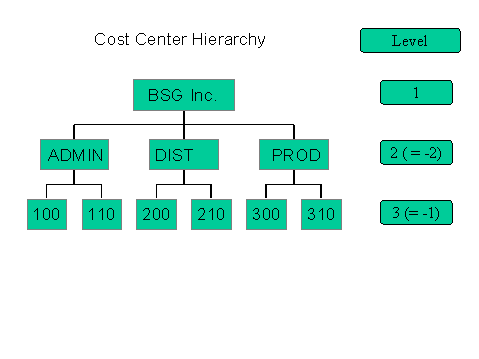
The following restrictions apply for the variation range (from and to level).
Entries possible for the from level of the variation range and the resulting restrictions for the to level
From level |
To level |
Positive [>0] |
Greater than/less than From level |
Negative [-1; -2] |
No entry |

The following example illustrates the variation range levels possible within a cost center hierarchy:
Navigating Within an Executed Report
For information on navigating within a report, see Navigating Within a Report.
To display the report data levels of detail for the data selection characteristics you can use the functions under the menu option View. You can vary the level of detail on a report, section or row level.
 (Variation previous level)
 (Variation next level)
If you select a single-dimension set containing a basic set, you navigate to the basic set level using (Variation next level).
For more information on defining selection criteria, see Defining Selection Criteria.