Connecting a Fully Automated Warehouse
Connecting a Fully Automated Warehouse
Purpose
If you want to implement the Warehouse Management system (WMS) in a fully automated warehouse, take the warehouse structure and the warehouse automation functions into account when deciding how best to distribute the warehouse management tasks between the WMS and the external system.
The WMS takes on the most important warehouse management tasks, even in a fully automated warehouse:
The external system takes over the entire warehouse controlling:

If you want to implement the WMS together with a fully automated external system, you should also consider the
Prerequisites
You have set up the interface between the WMS and the external system in the Customizing for Warehouse Management under Interfaces ® External Systems ®
Configure Warehouse Management.You have defined how the warehouse management tasks are to be divided between the WMS and the external system. Here, the level of automation in the warehouse plays an important role:
 identification points (ID points) and pick points.

Depending on the WMS movement type in the TO, the system steers the warehouse technology towards various picking points.
Process Flow
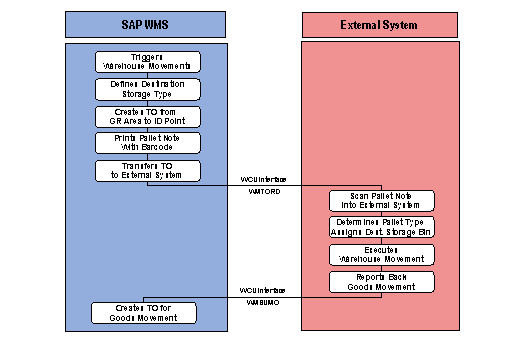
Putaway via ID points
The destination storage bin for putaway is printed on the pallet note in the form of a barcode.
The external system constructs the transfer order data in the form of an IDoc in the external system and sends the IDoc to the WMS.
Stock removal via a pick point
If you want to execute picking on the basis of outbound deliveries, the system treats each transfer order that is transferred as an independent pick order.
If you want to control picking according to other criteria (for example, relating to a route), you must ensure that the transmitted transfer orders are only picked by the external system once all of the relevant TOs have been transferred to the external system.

The TOs for a group can only be picked in the external system once the WMS has transmitted the release of the group using message type WMRREF.
If several pick points exist, the external system also assigns the individual picking activities and SUs to the available pick points. Only the external system can ensure optimal pick point assignment, since the utilization of the warehousing equipment is at the fore.
The external system displays the items to be picked on the screen at the pick point.
The external system constructs the transfer order data in the form of an IDoc in the fork lift control system and sends the IDoc to the WMS.
Returning the storage unit with the remaining quantity to storage
The external system constructs the transfer order data in the form of an IDoc in the external system and send the IDoc to the WMS.
For more information about returning storage units to stock, see
Partial Picking and Picking via the Pick Point.
Blocking Storage Bins
In automated warehouses, certain storage bins may not be accessible for the conveyor equipment.
Certain routes become inaccessible for the conveyor equipment, or certain storage bins can no longer be reached by the warehouse equipment.
Since you manage the warehouse in the WMS, you need to block these storage bins in the WMS as quickly as possible so that the WMS cannot plan any more warehouse movements for these storage bins.
The external system transfers the storage bins need to be blocked to the WMS using message type WMBBIN.
To trigger the WMS to lift the block on the blocked storage bins, the external system transmits the relevant storage bins or aisles to the WMS using message type WMBBIN.