 Assignment of Usage Objects
to Architectural Objects
Assignment of Usage Objects
to Architectural Objects 
 The assignment has to be made in the
usage view of the master data object (Architectural Link tab).
However you can create a usage object for an architectural object in the
architectural view (Usage Objects tab).
The assignment has to be made in the
usage view of the master data object (Architectural Link tab).
However you can create a usage object for an architectural object in the
architectural view (Usage Objects tab).
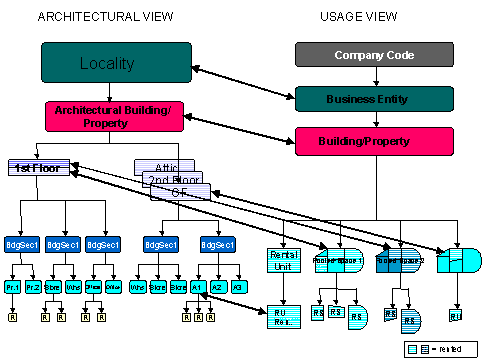
When you
link objects in the two views, you always have to start with the highest-level
object in the usage view. On the other hand, you have to start with the
lowest object in the structure when you remove the link between the
architectural and usage objects.

You have created a locality and an architectural building. You first have to assign a business entity to the locality in the usage view before you can link the building below it in the usage view to the architectural building.
