Architecture
Explanation
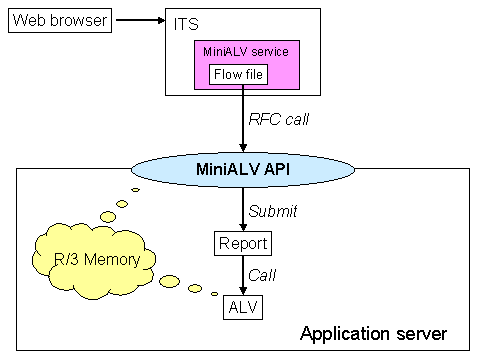
The graphic shows the components that interact to display a MiniALV in a Web browser. In the Web browser, the user navigates to an HTML page containing the MiniALV and transfers control to the Internet Transaction Server (ITS). The ITS starts the MiniALV service, which uses the flow logic to call an RFC-enabled function module in the SAP System. This function module is the MiniALV API on the application server, which is used by the MiniALV service to get the output files of a report to be displayed in the Web.

Standard MiniApps use the function module
The function module sets an indicator in the R/3 memory to inform the ALV that the report is displayed in the Web browser. It then calls the report - if required, with a layout or a selection variant.
This report is also called proxy report in the following documentation.
The proxy report calls the ALV. As far as standard MiniApps are concerned, this means that functions of the class
CL_GUI_ALV_GRID are used and no frontend objects may be generated.
Add-on MiniApps must use the function module
The indicator tells the ALV that the data is to be displayed in the Web. The ALV transfers the relevant tables to the MiniALV API by means of the R/3 memory.