

 Creating Breakpoints
Use
You use breakpoints to stop the execution of the XSL transformation at a certain point in the XSLT program. The XSLT debugger, in this case, interrupts the transformation immediately before the breakpoint line, that is, before a specific statement is called.
Prerequisites
Breakpoints can only be created for the source code of the XSLT program, not for the XML document.

Note that breakpoints can only be set for executable statements. Statements that cannot be executed include the following:
Procedure
Creating Line Breakpoints
In the XSLT editor
, you can set a line breakpoint in change mode as well as in display mode. Proceed as follows: XSLT Editor..
  icon in the application toolbar.
 In the XSLT debugger, proceed as follows to set a line breakpoint:
in the application toolbar. If the selected line only contains a non-executable statement, the breakpoint is automatically set in the next executable line. In this case, the system issues an appropriate message in the debugger message line. If the line already contains a breakpoint, the system deletes it.
The breakpoint line is always marked in yellow and the new line breakpoint is included in the breakpoint list.
Creating Template Breakpoints
In debugging mode and in the XSLT editor, you can stop the execution of the XML transformation at a particular template in an XSLT program.
To create a template breakpoint in the debugger:
 Breakpoint.
 The system displays a dialog box in which you can specify the breakpoint.
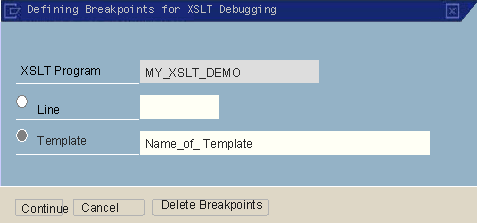
If you wish to create a line breakpoint at this point, choose Line and enter the appropriate line number in the input field.
If your entries were correct, the new breakpoint will be added to the breakpoint list. If you have created a template breakpoint, the new breakpoint is not highlighted in color, contrary to the case for line breakpoints.
Creating Program Breakpoints
Using program breakpoints, you can start the debugger already when the XSLT program is started.
To create program breakpoints for the current XSLT program in the XSLT editor:
.See also:
Saving Breakpoints Deleting Breakpoints