

 Articles: Basic Data
Use
In this user department, you define global article data not specific to a vendor or site.
Features
For information on:
See
Activities
For each article, you can enter, for example, the following basic data:
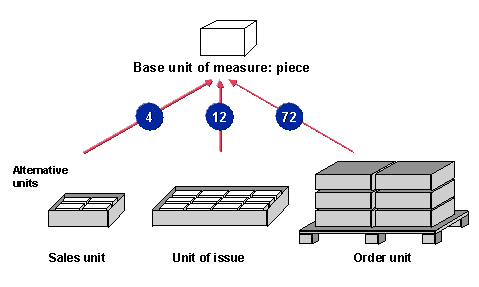
Besides the base unit of measure, you can specify alternative units of measure. If you specify an alternative unit of measure, you must specify the factor for converting it to the base unit of measure. You can flag individual units of measure as the sales unit, unit of issue (or delivery unit), and/or order unit as required.
When creating or changing purchase orders and purchase order items, it is not possible to change the base unit of measure in the article master record since the base unit is then locked to prevent inconsistencies. However, you can maintain other basic data in the article master record.
You can create an International Article Number (EAN) for each unit of measure. By choosing Additional data ® Additional EANs, you can specify additional EANs. See also
You can enter dimensions, volume, and weight for each unit of measure.
For a generic article, you can also choose the following functions:
This allows you to display the characteristics (such as color) used to describe and distinguish articles, and to select values (such as blue or white) for them. You can also define new characteristic values here and/or cancel existing ones.
This allows you to display the combinations of characteristic values that have been defined for a generic article, for example, the colors in which a particular size is available. You can also define new combinations here.
Additional Information
Articles: Additional Screens