

 Checking Initial States
You can choose to record the initial states of selected types of screen elements. The Recording Running ... dialog box is always available during recording. The part of the dialog box relevant to checking initial values is shown below.

If either Record with Active Checks or Record with Inactive Checks is selected, the initial states of the selected screen elements are recorded.
With Record with Active Checks the check flags are set. With Record with Inactive Checks the check flags are not set. Irrespective of which option you choose, you can later manually change the status of the flags in the structure editor.
At any time you can change the settings in Recording Running ... popup. This allows you to optimize the amount of data recorded. For example, if you are only interested in the contents of input/output fields on the final screen of a transaction, you can record only these. For the changes to take effect, you should choose Activate mode for initial states.
Example
An example of a command interface taken from a recording of transaction SE37 (Function Builder) is shown below.
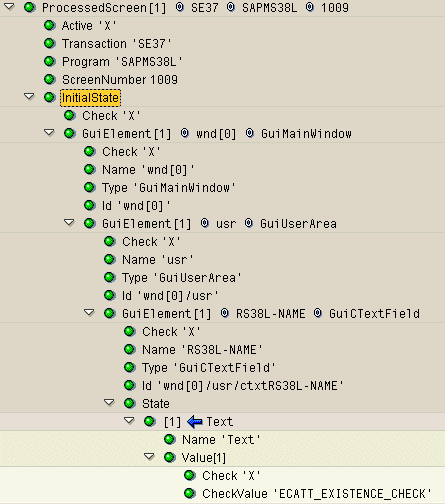
Under the InitialState node, you can see that the flag in each Check node, down to and including the screen element, is set. If any of these were not set, the check would not be made when the script is executed.
The name of the screen field (RS38L-NAME) is from the ABAP Dictionary.
The value against which the actual value during replay will be checked is that of the CheckValue node. This is by default the recorded value. However, you can parameterize it or replace it with another fixed value.