 The Modification Browser
The Modification Browser
An overview of all modifications and enhancements found in your system can be displayed from the ABAP Workbench choosing the function Overview
® Modification Browser (SE95). You can also display an overview from the Repository Browser using Environment ® Modification Browser.The following selection screen appears, where you can input selections that limit what the Modification Browser outputs:
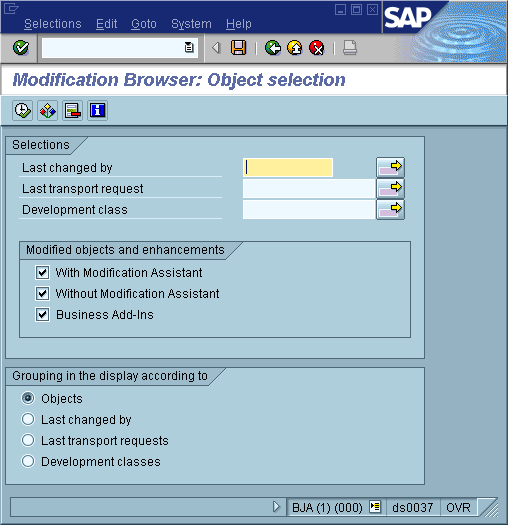
Standard selections can be made on the upper half of the selection screen by entering the development class or who the object was last changed by. If you insert the request number in the field Request/Task, then all modifications and enhancements that belong to this request's tasks are displayed in an overview. You can restrict display further by entering the number of a specific task.
Standard objects that are not supported by the Modification Assistant during modification or upgrade can be displayed using the Without Modification Assistant checkbox. This category also displays all objects that were modified in the current SAP System before the Modification Assistant was introduced. Business Add-Ins provide you with an overview of all enhancements and modifications undertaken in your system. This checkbox is set in the standard. Further information on this way to create enhancements can be found in the section on
Business Add-Ins.On the lower part of the selection screen, you can use the objects yet to be adjusted radio button to display a list of those objects that have yet to be adjusted since the last upgrade or patch. You can perform adjustments in transaction SPAU. Call this transaction using the menu path Utilities ® Maintenance ®
Upgrade utilities ® Program compare. For further information, see Adjusting R/3 Repository Objects.An overview of all changes to your system made With Modification Assistant resembles the following illustration:
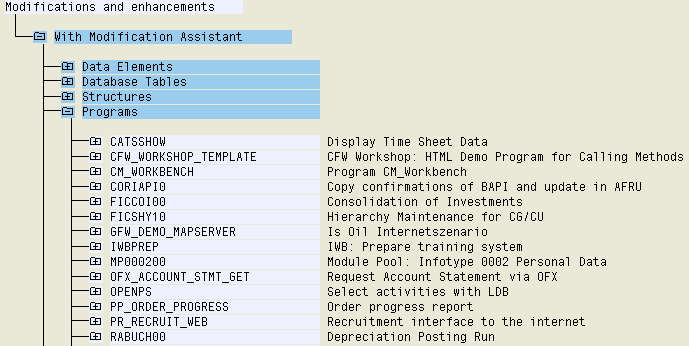
The Color key pushbutton displays a list of what certain highlighting colors mean within the Modification Browser.

Modifications to programs that cannot be assigned to a modularization unit (for example additional fields or comment lines preceding a subroutine) are displayed in the node External modularization units.

You can branch directly to ABAP Workbench tools from Modification Browser displays by placing your cursor on a specific object and choosing Display or Change.
Changes cannot be made to objects currently being adjusted.
You can also undo modifications from the Modification Browser by placing your cursor on a specific object and choosing Reset to original. Further information can be found in the section
Resetting to the Original.The Reset to original function can also be used with objects that were modified without the help of the Modification Assistant. Using this function causes the object to be deleted from the modification overview. Since no original is available for the object, it is now treated as an SAP original (modifications may, however, be lost during upgrade).
Objects that have yet to be adjusted also show up in the Modification Browser and are highlighted in color.