Schedule Execution Wait Time
Use
You can define waiting times between CATT functions or transaction screens in a CATT test case.
Waiting Times Between CATT Functions
At any place in the test script.
The current work process is released during the wait time. This can be useful in the following cases:
- If a transaction uses V2 update, it is also asynchronous in CATT, so the data may not be available for a following transaction.
- If a transaction updates in buffered tables, user function modules (function FUN) may access this data before they have been updated.

CATT functions avoid the buffered table access problem automatically.
Procedure
Define the parameter
&LWT
as a local variable.
Assign a number or a parameter to the parameter at the points where you want to wait. The number is the wait time in seconds:
Function |
Object |
Text |
SETVAR |
|
&LWT = '5' |
Run the test procedure. The test is interrupted for the specified time at each point at which a value is assigned to the variable. The log is as follows:

Waiting Times Between Screens
The waiting time must be defined in the test script before the transaction call (TCD or function module test with dialogs). This waiting time remains active until you change the definition.
The current work process is released during the wait time. This can be useful in the following cases.
Procedure
Define the parameter
&LWD
as a local variable.
Assign a number or a parameter to the parameter at the points where you want to wait. The number is the wait time in seconds:
Function |
Object |
Text |
SETVAR |
|
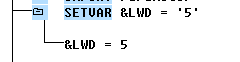
&LWD = '5' |
Run the test procedure. A waiting time is inserted from this position between transaction screens or function modules with dialogs. The waiting time in seconds is given by:
 The log is as follows: