Data Archiving Monitor
Data Archiving Monitor
Use
You can use the data archiving monitor to monitor and analyze information about writing of archive files (write jobs) and deletion of data from the database (delete jobs) during an archiving session.

Every archiving and delete job executed in the background in production mode sends information to the alert monitor. Archiving and delete programs started in dialog mode for test purposes only send information to the alert monitor, if the program is running on the server where the monitoring context DataArchiving was created.
Integration
The data archiving monitor is integrated in the alert monitor (transaction
RZ20 ) and can be called by choosing SAP CCMS Monitor Templates ® Data Archiving. You can monitor data archiving in the database monitor under SAP CCMS Monitor Templates ® Database ® DataArchiving.Features
The data archiving monitor provides the following functions:
Activities
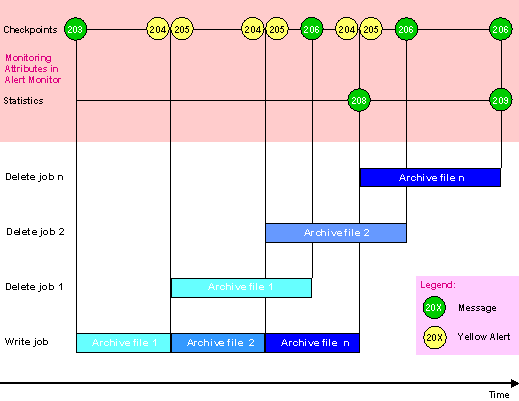
Every archiving and delete program based on the Archive Development Kit (ADK) generates a monitoring node (corresponding to the name of the archiving object) and the monitoring attributes Checkpoints and Statistics when first run.
The monitoring attribute Checkpoints collects important status messages and error messages (alerts). Once alerts are completed and there is no session that has errors or is incomplete for this archiving object (according to archive management), the monitoring attribute Checkpoints is automatically deleted along with all messages and alerts.
The monitoring attribute Statistics collects statistics about the last successfully completed archiving and delete sessions. The monitoring attribute Statistics, in contrast to the monitoring attribute Checkpoints, is not deleted.
The following graphic illustrates the timeline for a typical archiving session, including the messages and alerts for the monitoring attributes Checkpoints and Statistics displayed in the alert monitor. The messages are described in Messages and Alerts.