Prededuction
Prededuction
Use
Some companies allow terminating employees to extend their benefits plans beyond their leaving date, and may require them to continue to pay for these benefits. Since it is not possible to deduct the resulting costs and contributions after the employee's termination date, they must be deducted in advance for future payroll periods in the last payroll period in which the employee is processed.
This function is available in the Benefits component for plans that you specify as relevant for prededuction.

Prededuction is only supported for plans with costs (health, insurance, credit, and miscellaneous plans with costs). The only exception are flexible spending accounts, for which contributions can be prededucted.
Prerequisites
Since predeductions are processed by Payroll, you need to indicate which plans are relevant for predeductions in the Benefits section of the Implementation Guide for International Payroll or your Country Payroll.
Before you run payroll for terminating employees requiring prededuction, you need to ensure that participation in plans is terminated so that the plan infotypes are delimited in preparation for prededuction calculation.
Features
Prededuction is designed for companies that want to calculate costs/contributions for terminating employees as they would if no termination took place. In other words, it is not assumed that proration of costs/contributions is desired in all cases, rather it can be set up if required.
Prededuction Checks in Payroll
Each payroll run checks for a combination of all of the following values for each employee:
For employees who fulfill these criteria, the system considers all future payroll periods which fall into the validity period of the infotype record for the relevant plan(s), starting from the current payroll period.
Calculation of Predeductions
The predeductions that are calculated during payroll processing differ, depending on the date on which the infotype is evaluated. You determine this date by setting a value for the DATES parameter in the Benefits subschemas XBE1 and XBE2. Since you set the evaluation date per function relating to a plan category, it is valid for all plans in that category.
The significance of the different values for the DATES parameter is demonstrated below using the example of a health plan (Payroll Function P0167).
P0167 BEG
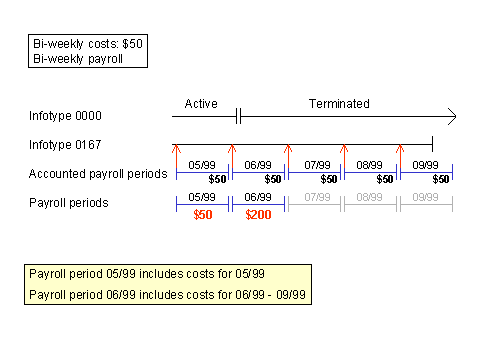
Infotypes are evaluated on the begin date of the payroll period. All future payroll periods whose begin date lies within the validity period of the infotype record are included, in addition to the current payroll period. No proration takes place for these payroll periods.
P0167 END
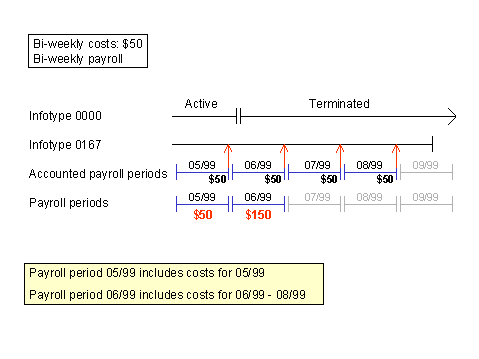
Infotypes are evaluated on the end date of the payroll period. All future payroll periods whose end date lies within the validity period of the infotype record are included, in addition to the current payroll period. Note that a payroll period that starts within the validity period of the health plan infotype record is not included unless the end date of the payroll period also falls into the validity period of this record. No proration takes place for these payroll periods.
P0167 CHK
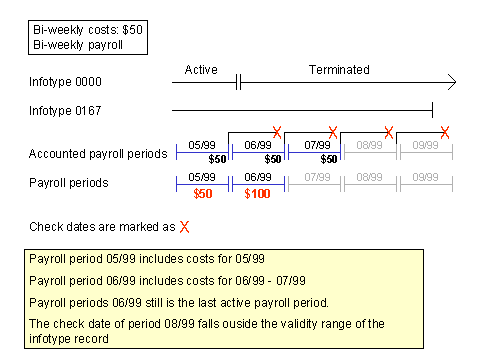
Infotypes are evaluated on the payroll period check date. All future payroll periods whose check date lies within the validity period of the infotype record are included in addition to the current payroll period.
Proration
If you want to use proration, you must set the values PER or BEGT for the DATES parameter. You should not use processing class 10 for proration.
P0167 PER
Infotype records are evaluated on the basis of calendar days, therefore proration takes place. If you set PER, proration takes place for regular and prededuction periods.

If you set the value PER, and use deduction models, these will not function correctly for prededuction.
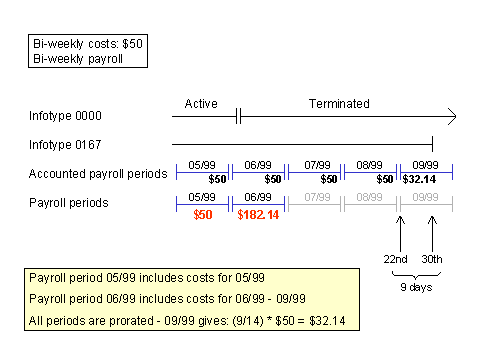
P1067 BEGT
You can set this value if you require proration for plans that are normally evaluated on the payroll period begin date. If you set this value, the infotypes are processed as usual with the parameter BEG except in the last period, which is prorated.
Prededuction with Deduction Model
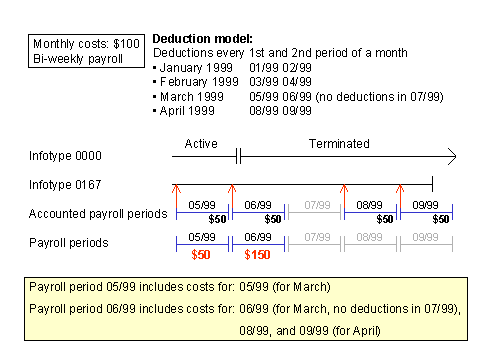
As of Release 4.6A, deduction models can be applied to future periods after the termination date.
P0167 BEG / END / CHK / BEGT
Only those payroll periods relevant for prededuction are included that must be accounted for according to the deduction model. The deduction model is then applied to these periods to calculate the prededuction amount.
Deduction models do not function correctly in combination with the data parameter value PER.
If you implement a deduction model, you should not set the values PER and BEGT for the same plan category.