 Preparation for Consolidation
Preparation for Consolidation
If you want to represent results for profit centers across company codes, it is necessary to eliminate internal business and profits which result from flows of goods and services within a group (or a consolidation area) which cross different company codes. For this elimination for cross-company-code transactions, you also need the partner information at the profit center level.
The system finds the partner company as well as the partner profit center from the customer or supplier master record and updates this in Profit Center Accounting. This makes this information available for profit center consolidation.
If you are not using the modules Sales and Distribution (SD) and Materials Management (MM), you must transfer the partner profit centers from your external system to Financial Accounting in R/3. If you are using the R/3 Logistics components, you have the following options:
In normal handling via purchase order and sales order, the partner information can be found automatically if
If these prerequisites are not met, you can still find the partner profit center using derivation rules. See the Implementation Guide (IMG) for Profit Center Accounting under
 Derive Partner Profit Center in Purchasing and Sales.
If the prerequisites are met for some or all companies, you need to activate reading of the partner profit center in Customizing, by identifying affiliated companies which are stored in you R/3 system and which use MM. The system can then find the partner profit centers for these companies by reading the purchase order (see Customizing).
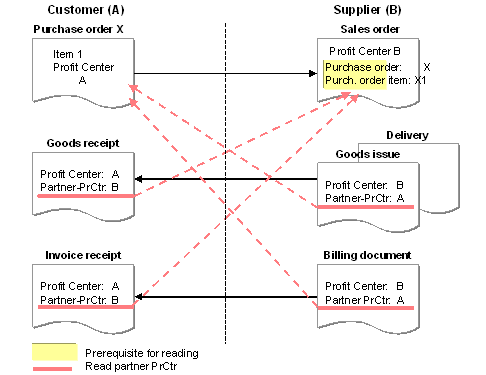
The partner information is found as follows: When you create the sales order for the purchase order, you enter the R/3 order number in the order header. Then you enter the corresponding items in the sales order items (Items
® Ordering data). This creates the relationship between the sales order and the purchase order. The system checks your entries for the ordering data in the sales order to see whether the customer is a partner company for which it should determine the partner information. Specifically, the system checks whetherWhen you post the goods issue and the billing document for the sales order in Accounting, the system reads the purchase order using the ordering information in the sales order. If the purchase order item is assigned to more than one profit center, the corresponding revenue line is split according to partner profit centers and posted accordingly in Profit Center Accounting.
Similarly, the system reads the sales order when you post the goods receipt and invoice receipt for the purchase order. The sales order item always contains one profit center only, which is then entered in the documents for the goods receipt and invoice receipt as the partner profit center.
This process is illustrated in the graphic below:
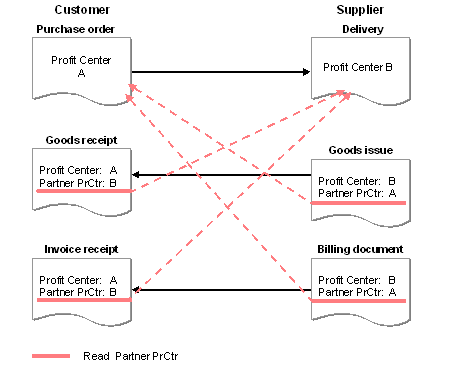
In stock transfer orders (stock transfer with delivery and billing document), the system automatically creates a delivery note based on the purchase order. (A sales order is not used.) In this case the ordering information is passed on by the system and therefore does not need to be created manually. The partner is then found the same way as described above, except that the system reads the delivery note instead of the sales order upon goods receipt or invoice receipt.
This case is illustrated in the graphic below:
Stock transfers across company codes which are created directly in inventory management are handled the same way as stock transfers within one company code. Thus they pose no additional difficulties.
For cost accounting allocations across company codes, the partner profit center can always be determined automatically based on the CO objects involved (cost centers, orders, and so on).
In warehouse sales which are independent of company code (cross-company scenario) the system finds the partner profit center for intercompany billing (IB) by reading the customer billing document (or the customer credit memo in the case of a return delivery). To be able to do this, the customer billing document (or customer credit memo) must have been created before the IB document.
When an invoice is received for an internal billing, the partner profit center can be set using a user exit. If you do this, it will no longer be possible to determine the partner profit center automatically.
You can carry out profit center consolidation in the R/3 System using Consolidation (EC-CS). (See also Role of EC PCA in the R/3 System.).
For more information, see the Implementation Guide (IMG) for Profit Center Accounting, under
Preparation for Consolidation.