 Consistency of the Valuation Settings in Different Applications: Currency and Valuation Profile
Consistency of the Valuation Settings in Different Applications: Currency and Valuation Profile
Definition
The currency and valuation profile determines which valuation views can be stored in which currencies.
The combination of currency and valuation view -- for example, group currency and profit center view -- is referred to as a valuation approach or valuation method.
See also
Transfer Pricing Concepts.Use
You need to assign the currency and valuation profile to a controlling area and then activate the profile. This ensures that the data is updated consistently in all the affected applications. The system checks whether the valuation approaches in Controlling, the material ledger, and Financial Accounting as well as the settings for the company codes, depreciation areas, and plants are consistent with the profile.
Structure
Release 3.0 already allowed you to store multiple currencies in the financials applications. In Release 4.0, the "currency type" has been extended to include the dimension "valuation view".
The currency and valuation profile consists of a combination of currency type and valuation view. You can store up to three valuation views in up to two currencies throughout your system. (If you use three views, two of these must use the same currency.) The combination of valuation view 0 (legal) and currency type 10 (company code currency) is automatically contained in each profile in order to fulfil legal requirements.
Example: Currency and valuation profile
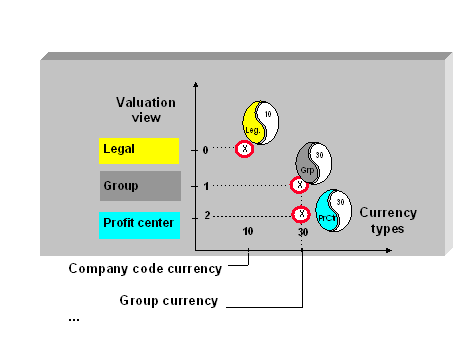

Release 4.0 supports a limited number of possible combinations. To see which valuation approaches you can use, see Customizing.
You define your currency and valuation profiles in Customizing under Controlling
® Controlling General ® Multiple Valuation Methods/Transfer Prices ® Basic settings ® Maintain currency and valuation profile.Integration
Once you have created the profile, you need to specify which valuation approaches (which currencies and valuation methods) you want to store in your system. You do this by assigning the profile to your controlling area and then activating it.

You can deactivate the currency and valuation profile again, provided that no data has yet been posted to the affected applications. As soon as there is transaction data in one of the affected applications, it is no longer possible to take back the settings made for the currency and valuation profile. For further information on deactivating parallel valuation approaches/transfer prices, see Customizing, under General Controlling.
You assign the currency and valuation profile in Customizing under Controlling
® Controlling General ® Multiple Valuation Methods/Transfer Prices ® Basic settings ® Assign profile to controlling area. You activate the profile under Controlling ® Controlling General ® Multiple Valuation Methods/Transfer Prices ® Activation ® Activate multiple valuation approaches. When you do that, the system checks that all the settings in the controlling area are consistent.To read about how to activate the valuation settings in the individual applications, see
Representing Multiple Valuation Approaches in Individual Applications.If you try to change a setting later that would affect valuation, the system asks you to first deactivate the currency and valuation profile. After you have made the change, you need to activate the profile again, thereby triggering the consistency check.