 Setting HTMLBusiness Editor Options
Setting HTMLBusiness Editor Options
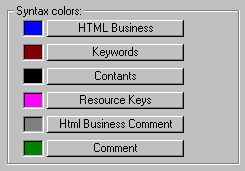
To support the development of HTMLBusiness templates, the HTML Business editor displays the various elements of HTML Business code in different colors. This makes the code more easily readable, and distinguishes it from standard HTML code.
You can change the default colors for each element of HTMLBusiness to suit your needs.
Procedure
To set colors for displaying HTMLBusiness code in the HTML Business editor:
You see a list of HTMLBusiness elements with their HTML Business editor default colors:
Result
The SAP@Web Studio resets the default color for the element.