
Changeovers and Timing of Changeovers in Retail
The timepoints involved in the changeover and how these relate to each other play an important role in the changeover in Retail. The graphic uses an example to show these relationships for the changeover in the following functional areas:
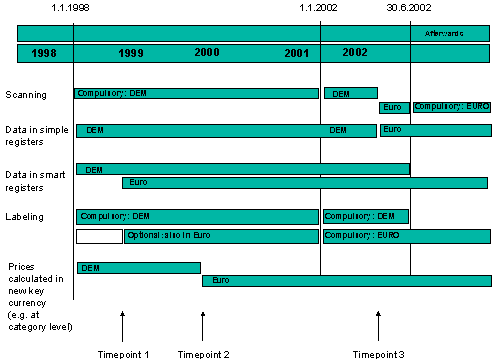
Generally speaking, all changeovers must be completed by the end of the dual currency phase.
This is also the only restriction on local currency changeovers, that can be performed at any time during the dual currency phase. The best time to do this is at the end of the business year. Further changeovers in Retail should, however be performed by 01.01.2002, when the euro becomes legal tender. This date should be kept in mind when implementing the three changeover stages described in more detail below.
Timepoint 1
By this date you should have set up your SAP system to ensure that parallel sales prices are available throughout. This means, for example, that you will now be able to display dual prices at any time, regardless of whether you do this voluntarily or for legal reasons. Even if your company does not use dual price displays, you should perform this changeover as early as possible, and in any case before 01.01.2002.
This will have the following effects on individual functional areas:
Sales price calculation is not yet affected; the calculated sales prices will continue to be rounded off to the nearest price point in the national currency.
All sales prices are now available throughout the system in both the national currency and in euros and both forms can therefore be used in labeling. It is recommended that the sales price that has been calculated in the national currency (main sales price) is somehow emphasized on price labels that display dual prices.
There is a difference between simple registers, which only recognize a single currency, and smart registers that can deal with several currencies. In the first instance, you must make sure at POS outbound processing that only the price in the national currency (the current main sales price) is used in supplying registers. This problem does not arise in the second instance as both sales prices are stored in the POS system in separate files.
Scanning will continue to be performed in the national currencies. In smart registers, the scanner automatically takes the national currency price from the correct file.
Timepoint 2
The currency in which the sales prices are calculated and rounded off (main sales price currency) is converted from the national currency to euros for individual areas. As this changeover can be performed differently for different organizational levels (distribution chains, sites and price lists), it is advised that you carry out the changeover at different times for each level. This means that there are actually several versions of timepoint 2 (e.g. 2a, 2b, etc.).
This will affect individual functional areas as follows:
All affected sales prices are recalculated in euros, and the relevant parallel prices are then converted back into the national currency using a fixed rate.
All sales prices will continue to be available throughout the system in both the national currency and in euros, allowing both forms to be used in labeling. It is recommended that the sales price that has been calculated in euros (the new main sales price) is somehow emphasized on price labels that display dual prices.
If you are using simple registers, you must make sure at POS outbound processing that the parallel sales price in the national currency (converted from euros without rounding off) is now used in supplying registers.

The sales price in the national currency is now determined using another condition type (in the standard system, for example, this would be VKPE for standard sales prices, and VKAE for promotional sales prices). This means that sales price determination at POS outbound processing cannot be performed using condition types, but only using the currency of the POS registers.
Scanning will continue to be performed in the national currencies.
Timepoint 3
At this point, scanner cash registers are to be converted from the national currency to euros.

This may not take place before timepoint 1.
Sales price calculation is not affected.
If you have not been using dual price displays, you will now need to re-label your stock.
If you are using simple registers, you will now need to completely re-supply them.
Scanning will now be performed in euros. In smart registers, the scanner automatically takes the national currency price from the correct file.
As far as the correlation of the timepoints mentioned is concerned, timepoint 1 has to come before timepoint 3, while you can set timepoint 2 for any time.