 Determining Resources to be Billed
Determining Resources to be Billed
In resource-related billing, individual materials, internal company services and costs are passed on to the customer.
You can access expenditure information:
The resource items determined are assigned to sales order items using service materials. Internal company services and costs are represented as activities. You define activities for the corresponding application (internal orders, maintenance, project system) in the Implementation Guide for cost elements cost center/activity type combinations statistical key figures
If you want resource-related billing to take these activities into account, you need to create activity materials for them.
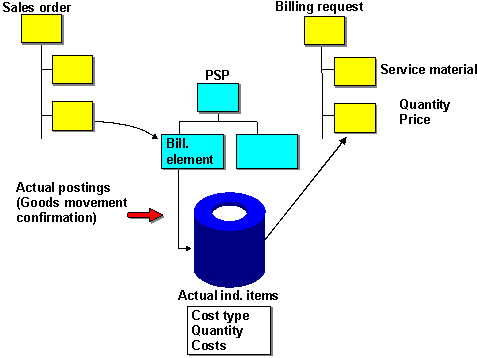
During billing the system converts the cost centers/activity type combinations contained in the line items for the corresponding service and they are copied into the billing request. There, the activities form the basis of pricing and text determination. An item is created in the billing request for each of the resource items determined.
Information on the quantity and cost is also copied to the billing request from the individual items.
If the system can not determine a quantity for the service, then it automatically assigns quantity 1 (e.g., converting costs into activities).
The cost information is copied to a special condition type. Valuating individual resource items is carried out using the conditions set in the Implementation Guide.
For further information on pricing, see Sales and Distribution ®
Conditions and Pricing.
If a billing document has already been created for an object, then the system checks which items have already been billed when creating a new billing request.
In the billing request, the system only copies items that have not yet been billed.
If only a partial quantity was billed, only the remaining quantity is copied into the billing request.