 Valuation in Procurement and Sales
Valuation in Procurement and Sales
Use
To use transfer prices, you must transfer values using multiple valuation approaches between the individual companies in your organization.
It is usually not desirable to have to edit or even create multiple valuation approaches by hand. Consequently, the system uses automatic data interfaces to ensure that parallel values are transferred for all purchasing and sales transactions. The following section describes what settings you need to make to set up these parallel value flows.
Integration
A typical example would be the following process:
Features
In order to ensure that all value flows are updated automatically and consistently throughout the system, the following documents need to be transferred automatically between company codes in the group:
In Release 4.0A, you need to use the IDoc interface and thus also the ALE functions. This is also the case when both company codes are in the same system. Consequently, you have to carry out the following steps to set up the transfer of multiple valuation methods:
Initial Steps in SD
Prerequisite for transferring parallel values between company codes is that you include the necessary conditions for the profit center valuation view and the concern valuation view in your pricing procedure.
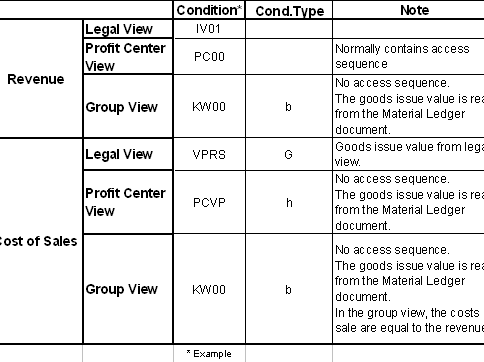
For technical reasons, only one "real" pricing condition is permitted per pricing procedure. The profit center valuation view and the group valuation view must therefore be created as static conditions. The following conditions are obligatory:
Internal billing document (to affiliated company)
External billing document (to customers)
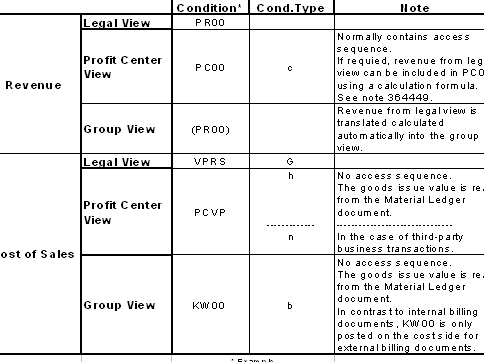
For a detailed description of the condition technique and multiple valuation approaches, see OSS note 135288.
 Third-party business transaction / profit center valuation view
In third-party business transactions, the billing company code and the delivering company codes are not the same. This also applies to the billing and supplying profit centers. In the profit center view, note the following:
The supplying profit center receives its revenue through internal clearing (condition PC00). At the same time, this revenue represents the cost of sales for the billing profit center (condition PCVP). You now have to ensure that PC00 is transferred after PCVP.
To do this, assign the same access sequence to both conditions. The condition category h, which is normally used for the moving average price in the external billing document, reads only the goods issue value from the material ledger document. As such, it does not have an access sequence assigned to it. For third-party business transactions, you must therefore add another condition category to PCVP, that being condition category n.
Setup of the ALE Functions
To transfer the values automatically to the purchasing company code, you need to define the same settings you normally define in Customizing for ALE (see ALE - Consultant's Guide).
Settings for the Data Transfer to Invoice Verification
Prerequisite for posting the invoice in the purchasing company code is that the purchase order number and the purchase order item be transferred as reference information.
In addition, you can predefine the document types and program parameters in Customizing under Materials Management ® Invoice Verification ® Conventional Invoice Verification ® EDI. Typically, the keys and the value-added-tax indicator and the company code are converted for this transfer.
Once you have made these settings, every incoming invoice from a vendor that is defined as an affiliated company in its master record (VBUND indicator) will be posted using parallel valuation methods.
With a third-party business transaction, the goods receipt is made via the EDI interface in Financial Accounting, as there is no purchase order in the billing company code.
If the goods receipt from an affiliated company takes place before the invoice receipt, the goods receipt is valuated in the legal valuation view at the order price. In the profit center valuation view and the group valuation view, the system takes the current material price for each valuation view from the Material Ledger. Using customer enhancement EXIT_SAPLPC32_003, you can ensure that in the profit center view or group view, the goods receipt is valuated with the order price according to the legal view in certain cases.
When an invoice comes from an affiliated company, the system expects the corresponding IDoc to contain all valuation views that are stored in the controlling area. If this is not the case, because the supplying company belongs to the group but does not use multiple valuation approaches, the system sends an error message. In such cases, you can avoid error messages by using customer enhancement EXIT_SAPLPC32_004. For further details, see OSS note 366968.