 SETVAR - Assign values to variables and parameters
SETVAR - Assign values to variables and parameters
Values can be assigned to variables and parameters in a test case using the function SETVAR. These values remain valid for the entire test case, unless you overwrite them.
Value assignment types:

Constants must always be enclosed in inverted commas ‘ ‘.
The decimal sign is a point (period). Other separators (e.g. thousands) are not allowed.
If you need leading zeros, enter them.
Conventional value assignment
A constant value is assigned to the variable as follows:

Funct. |
Text |
SETVAR |
&EXAMPLE = ‘1000’ |
Result:

Funct. |
Text |
SETVAR |
&EXAMPLE2 = &EXAMPLE + ‘20’ |
Result:

Funct. |
Text |
SETVAR |
&EXPORT = &M01 |
Result:

Funct. |
Text |
SETVAR |
&EXPORT = &M01+2(8) |
Result:

Funct. |
Text |
SETVAR |
&EXAMPLE+002(006) = ‘Insert’ |
Result:
Funct. |
Text |
SETVAR |
&EXAMPLE+132 = ‘Append’ |
Result:
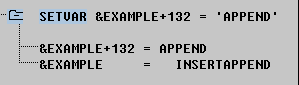
Leading zeros and decimal places

The
SETVAR statement operand sequence is significant for decimal places and leading zeros in arithmetical operations.The leading zeros are lost and the decimal point position does not behave as required by database queries in numerical variables.
Avoid this problem by setting the first operand on the right-hand-side of SETVAR value assignments and arithmetic operations correctly.
Decimal places
In arithmetical operations, the decimal places are set in the result according to the decimal places in the first operand.
Funct. Text
Funct. |
Text |
SETVAR |
&V01 = ‘01.11’ / ‘0000002.22222’ |
(calculated: 0,4995004995...)
(result: &V01 = 00.50)
If the output format truncates decimal places, commercial rounding is used.
Assigning values from a table (SETVAR <table>)
You can assign database table values to variables during the test procedure. You must specify the complete key.
For database tables, only the key fields (ARG) are initially displayed. You can display the function part (FKT) fields by choosing Edit
If the key is not completely specified, those key field which are not specified take the initial value for their type (spaces for CHAR, "0" for NUM).
The table variable assignment function can now calculate the sum of field contents. Enter the same variable in all the fields which you want to sum. The test procedure sums the values of these fields (e.g. sum of G/L account postings) and assigns the total to the specified variable.
You can identify SETVAR table calculations in the log by a preceding plus sign (+).
