 Message variables
Message variables
Use message variables to read the variable contents of system messages. System messages contain up to four variables, so there are four message variables in test cases.
Message variables start with &M followed by a two-digit number (01 - 04). Variable &M01 refers to the first variable component of a system message, variable &M02 to the second, and so on.
If you want to use the contents of these variables for processing, you must pass them to local variables or export variables.
Other message variables, with which you can get further information about system messages, are in
CHEERR - check error message under "Special test case system message variables".
The transaction "Create Vendor" sends a success message containing the vendor number. Get that number in your CATT test module.
You get a transaction success message. It consists of the message ID followed by the message text
log.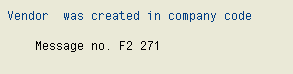
When comparing this message text with the one in the log, you will see that the account number and the company code number are replaced with blanks. These blanks are the place holders you can read using the message variables. The system puts the vendor number in the first message variable &M01 and the company code in the second message variable &M02.