 Selecting Employees for Processing
 Selecting Employees for Processing
Use
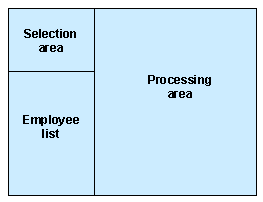
The transactions for individual employee processing in Benefits enable you to select employees for processing and perform your processing tasks on a single screen. You initially select employees for inclusion in the employee list, which is displayed throughout processing. From this list, you then select and process individual employees.
The following graphic shows the layout of the screens for individual employee processing:
Procedure
In the selection area, you select the employees that you want to process. The selection technique that you use depends on whether you want to select individual employees or groups of employees:
 Choose. Add to add your selection to the employee list or Replace to replace the contents of an existing list with your selection.
Result
The employee list is updated according to your selection, and you can sort the employee list, apply a filter, or delete the list as required.
To process an employee, single click on the appropriate entry in the employee list. The relevant data for the selected employee is automatically displayed in the processing area.

The employee list is stored in the ABAP Shared Memory and usually remains available throughout your work session. If the memory reaches its maximum capacity or is refreshed, however, you will need to regenerate the list.