 Sorting and Subtotals
Sorting and Subtotals
In this example, suppose you want to generate a list which contains booking information for each flight. You want to display a subtotal giving the amounts paid per booking in each case and an overall total at the end of the list.
In addition, you want to determine how many bookings per flight and the total number of bookings made.
You can use G5 as the basis for this: Copy it and call it G6. Then, change the title and note.
You must now extend the field selection by a few fields from the InfoSet Bookings.
On the Basic List Line Structure screen, you extend the definition of the basic list. You also specify which field you want to sum. Since you want to sum the Booking price in foreign currency field, you select the column Total for this field.
In order to count the number of bookings, select the checkbox for this entry in the Counter column.
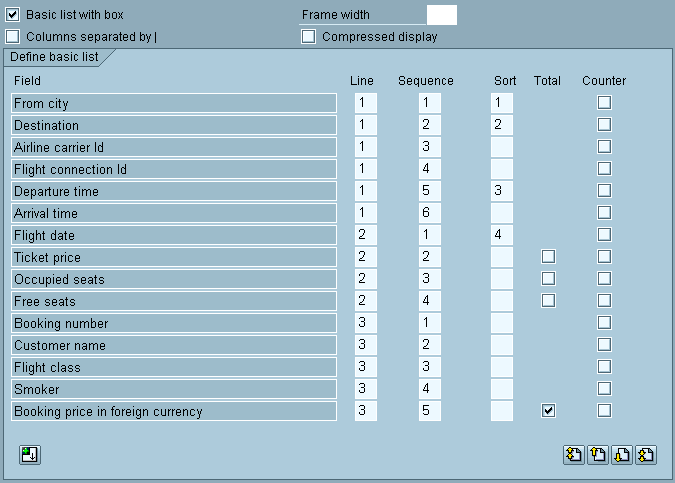
If you continue with the normal sequence of screens, you now branch to the screen where you can specify output options for each control level. Since you want to display a sub-total and the number of bookings for each flight, you select the columns Total and Counter for the field Flight date.

On this screen, you cannot determine the field you want to sum or count, but only at which level you want to display a sub-total or number of bookings for the fields you have defined on the Basic List Line Structure screen for summing or counting respectively.
In addition, you have chosen the Box option for the field Flight date.

On the Field Output Options screen, you also specify that you want to display the price per booking, including the currency.

To execute the query, select Execute. You then see a list with an overall total and number of bookings at the end:
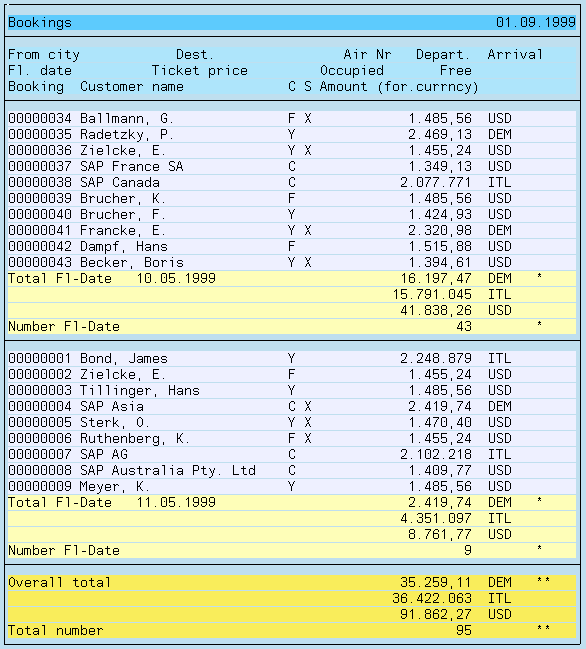
If you are totaling a particular field, the total is output in the same column as the field, that is with the same output length. For this reason, the output length may be too short for the total and cause overflow. ABAP identifies these overflows by placing an asterisk in front of the affected value when it is output.
To avoid overflows like this when outputting totals, you can simply increase the output length of the field. This is possible on the screen Output Options Field.
In the above example, summing is performed on a field which contains currency amounts. Here, a currency distribution is generated automatically, that is, the individual currency amounts are summarized depending on their currencies.
Currency-specific summation also applies when you specify the output of the currency amount field without a unit. Then, several currencies (without a currency) appear in the totals lines. For this reason, you should always output currency amounts with a currency.
The same applies to quantity fields. If you specify summation for a quantity field, this is performed according to the units involved and results in a distribution in the totals lines.
Finally, the options Total and Counter should be compared one more time.
The Total option causes the grand total of a specified numeric field to be calculated. This means that each time the field is read in a dataset, the field’s value is added to the sum total. The grand total is displayed at the end of the basic list. With control levels, you can also display subtotals. A subtotal contains all values of a field that are assigned to a particular control level, that is a particular sort string.
The Counter option causes the counter number for a particular field to be increased by 1 every time that this field is found within the data set currently being read. The resulting counter total is displayed in much the same manner as a grand total at the end of the basic list. Just as with sum totals, counter subtotals can be displayed for individual control levels. These counter subtotals show how many values have been assigned to a particular control level.
If the both the Total and Counter checkboxes have been selected for a numeric field, the counter number is always equal to the number of addends for that field.
The Counter option can also be selected for non-numerical fields.