 ABC Analysis
ABC Analysis
The ABC Analysis function can be used for any interactive basic list, all statistics and any ranked list that contains at least one numeric field.
For the ABC analysis the data records of a dataset are divided into three groups (A segment, B segment, C segment). Each of the data records must include a key figure (a numeric field) and an arbitrary number of other characteristics (non-numeric fields). The dataset is initially sorted on the key figure in either descending or ascending order. The data records can then be divided into groups according to one of four strategies:
The data records are divided into groups according to the size of the partial sum of the key figures considered as a percentage of the sum of all the key figures. For example, if the following distribution is chosen: A=50%, B=30% and C=20%, then the data records are allocated to segment A as long as the sum of the key figures does not exceed 50% of the total. The data records will then be allocated to segment B until the partial sum of the key figures reaches 80% (50+30) of the sum of all the key figures. All other data records will be allocated to segment C.
The data records are divided into groups on the basis of the absolute values of the key figures. Two boundary values have to be specified, one to mark the boundary between the A and B segments, and one to mark the boundary between the B and C segments. These boundary values are used to determine the segment to which each data record should be allocated.
The data records are divided into groups so that a specific percentage of the data records are allocated to each group. For example, if the following distribution is chosen: A=50%, B=30% and C=20%, then the data records are allocated to segment A until 50% of the total number of data records have been allocated. The data records will then be allocated to segment B until the partial sum of the key figures reaches 80% (50+30) of the sum of all the key figures. All other data records will be allocated to segment C.
A specific number of data records are allocated to each group. For example, if the following distribution is chosen: A=10, B=20 and C=... , then the first 10 data records are allocated to segment A, the next 20 to segment B and all remaining data records are allocated to segment C.
When the ABC Analysis function is called the column containing the key figures must be determined first. This depends on whether the ABC analysis is called from the list display or from the table display (display using the table view control).
Position the cursor on the column whose values are to be used as key figures. If you have placed the cursor on a non-numeric column then the next numeric column will be used.

The ABC analysis cannot be carried out for additional fields in statistics and ranked lists (number of records read, percentage of total, average value, position in sequence).
Select the column whose values are to be used as key figures.
All non-numeric values to the left of the key figure are regarded as characteristics. This is especially important when the analysis is called from the table display, since columns can moved around in this display and it is therefore possible to change the number of values regarded as characteristics.
When the ABC Analysis is first called a dialog window appears. The sort order for the key figure (i.e. ascending or descending) and the analysis strategy to be employed have to be specified in this window. This window also contains the names of the fields which are to be used for the key figure and the characteristics.
The analysis strategy is defined in two steps:
If the key figure is a currency field or quantity field, then a check is made in single line basic lists that the currencies or quantities have been specified in the same currency or unit of measurement. This check can be made only if the currency or unit of measurement is also output in the list. When different currencies or units of measurement are present, these are first converted into a reference currency or unit of measurement. This reference currency or unit of measurement can be entered in a dialog window. If errors occur in the conversion, then the ABC analysis cannot be carried out.
The result of the ABC analysis is a list. The first column of this list shows the segment (A, B or C). Then come the characteristics and finally the key figure. Next to each key figure there are two percentages: the percentage of the total sum of all key figures represented by this key figure and the cumulative total to this point. The list also includes the total sum and the intermediate sums related to the individual segments as well as the sums of the A and B segments and of the B and C segments.
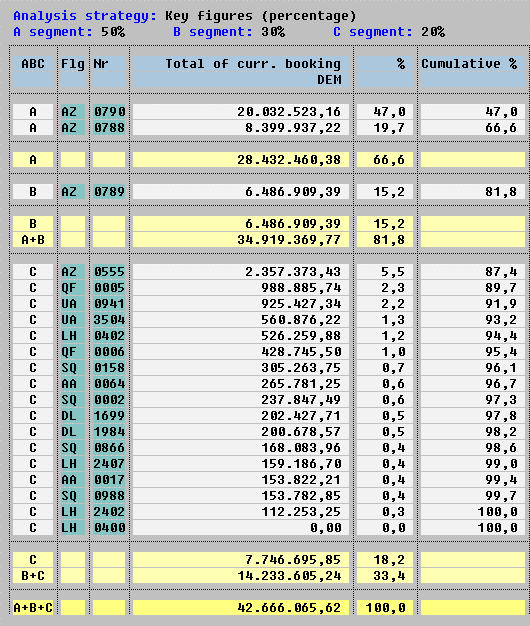
The following interactive functions can be used on the result list of the ABC analysis.
The Hide columns function can be used to remove chosen characteristics columns from the display. Place the cursor on the characteristics column to be hidden and then call the function.
The Show columns function can be used to re-display columns which were hidden with the Hide columns function.
This function is of use if a list or table contains further characteristic columns (non-numeric fields) to the right of the key figure column when the ABC analysis is called. Normally these characteristics are not included in the result list of the ABC analysis. The Edit ® All characteristics function can be used to include these characteristics in the result list. They will, however, appear to the left of the key figure.
This function allows you to convert currencies and quantities into reference currencies or units of measurement. Conversion is, however, only possible if a currency or unit of measurement exists for all currencies and quantities in the dataset. The conversion is always based on the values in the dataset, so that it is also possible to perform multiple conversions.
The Print function can be used to print the result list of the ABC analysis. The printed form of the list will correspond to the current screen display, so that hidden columns will also not appear in the printed list.
This function can be used to start a new ABC analysis on the same dataset.
The Back function takes you back to the list.