 Securities Account Transfer
Use
Using this function, you can transfer positions from one securities account to another within a company code at the book value.
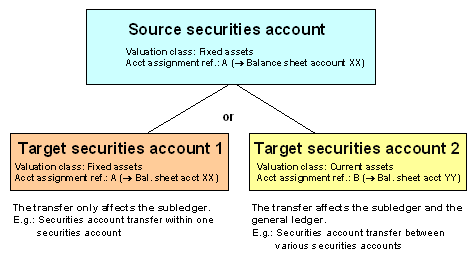
The securities account transfer can affect the general ledger as well as the subledger, since by switching the securities account for a position ( = change in the subledger accounting), you can switch both the valuation class and the account assignment reference of the position, if the target securities account has a different account assignment reference in the position indicator from the source securities account ( = change in the general ledger accounting).
Overview: Securities account transfer
Prerequisite
You must have created the
Position Indicator for the target securities account.
You must have performed a
Period-End Closing on the calculation date for the source securities account.
Features
The securities account transfer takes the transfer amount at the book value off the books in the source securities account and posts it to the target securities account. Depending on which position management procedure you use, the system generates the following flows:
Position management procedure |
|
Standard |
Securities account transfer within a securities account group
Adjustment Flows Securities account transfer between different securities account groups Adjustment flows |
Net LAC / SAC |
Securities account transfer within a securities account group Post amortization for the group of the source securities account
- Transfer amortization pro rata
- Adjustment flows
Securities account transfer between different securities account groups - Post amortization for the outgoing position
- Transfer amortization pro rata
- Adjustment flows
|
Gross LAC / SAC |
Securities account transfer within a securities account group Post amortization for the group of the source securities account
- Transfer amortization pro rata
- Transfer discount/premium pro rata
- Adjustment flows
Securities account transfer between different securities account groups - Post amortization for the outgoing position
- Transfer amortization pro rata
- Transfer discount/premium pro rata
- Adjustment flows
|
See also:
The documentation in the Implementation Guide (IMG) for the securities area for the Assign Position Management Procedure activity.
Activities
Choose Back office ® Position management
® Securities account transfer.Enter the company code, the ID number, the source securities account and the calculation date.
The system defaults to the current date as the calculation date. You can overwrite it, if necessary.
The screen for editing the securities account transfer appears.
The upper part of the screen displays the general position data
.
The Securities account transfer area shows you the current position of the source securities account
.
You also enter the Target securities account here using the F4 Help to display the securities accounts you can choose from.
The Flow types are predefined in the system, but you may overwrite them
.
In the Values area, you enter the number of units you want to transfer or the nominal amount.
For interest-bearing securities, the Coupon date field displays the next interest payment. By choosing the Dates pushbutton, you choose one of the following interest dates. The system determines the date from which the interest payments are made to the new securities account (target securities account) according to the coupon date you enter here.
The Posting control area includes the following fields:
- Posting date
: This field is automatically filled with the calculation date.

If you choose a posting date that differs from the calculation date, make sure that the posting date is not before the calculation date.
- Document date
: Enter the document date.
- Assignment text
: You can define a short text for this activity which is transferred to the accounting department.
Choose  Cash flow (source securities account). This shows you how the cash flow of the source securities account will look after the securities account transfer has taken place.
Choose
Cash flow (target securities account). This shows you how the cash flow of the target securities account will look after the securities account transfer has taken place.
To execute the transfer, choose Save.
The system generates the flows required for the transfer and updates the position in the relevant securities account.
The transfer is recorded in a posting log.
Cash flow (source securities account). This shows you how the cash flow of the source securities account will look after the securities account transfer has taken place.
Choose
Cash flow (target securities account). This shows you how the cash flow of the target securities account will look after the securities account transfer has taken place.
To execute the transfer, choose Save.
The system generates the flows required for the transfer and updates the position in the relevant securities account.
The transfer is recorded in a posting log.