Example: Order BOMs in Variant Configuration
Example: Order BOMs in Variant Configuration
The
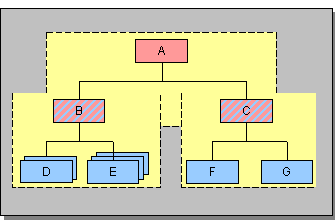
material BOM of material A contains components B and C, which are assemblies. The material BOM of material B contains components D and E. Component D has 2 variants that have dependencies. According to the values assigned in the sales order, only one of these variants is used. Similarly, component E has 3 variants. The following graphic shows this BOM as a multi-level super BOM with all variants.Multi-Level Super BOM
Once you have assigned values to the characteristics of material B, it transpires that the second variant of component D and the first variant of component E are selected. (The components that are not used are shown in black in the following graphic.)
Multi-Level Super BOM After Characteristic Value Assignment and Before Fixing
You fix the assembly. When you save the configuration result, the system generates an order BOM for
material B. If Result-oriented BOM is set in the configuration profile of the configurable material, the system only creates the components that are used in the order BOM (see Creating a Result-Oriented BOM). If this indicator is not set, the system creates an order BOM that contains all components of the super BOM and the local dependencies as a copy, referencing all other data (see Creating a Knowledge-Based BOM).Order BOM After Fixing – Result-Oriented BOM