Screen Layout
Screen Layout
Use
Using the screen layout control, you can modify the field characteristics of appropriation requests and appropriation request variants to your individual requirements.
Features
Screen Layout of Master Data Fields
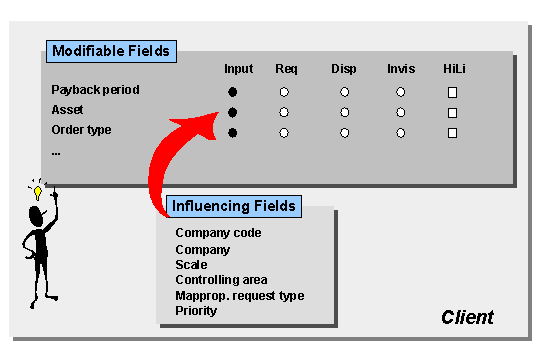
You can control the field characteristics of master data fields dependent on the entries in certain influencing fields (Customizing: Master Data
® Control Data). The following the influencing fields can be used for appropriation requests:Depending on the contents of the influencing field, you can specify whether a field is
You can use this function, for example, to specify that the cost center is a required entry for certain appropriation request types, and an optional entry for others. It is also possible to make the investment reason a required entry when the appropriation request has a certain scale.
Screen Selection for Appropriation Requests
In the initial screen of the transaction for creating an appropriation request, you can enter only the appropriation request type and the controlling area. As a consequence, influencing fields, such as company code, company, scale and priority, do not have any influence on the screen layout at first. You do not see the affects of the influencing fields until you save the appropriation request. The system then issues an error message if there is a disagreement.

You should be aware that it is possible for the specifications for influencing fields to contradict each other.
You have the option of defining the screen layout control without using influencing fields. The screen layout you define is then valid for all influencing fields in the client, regardless of their contents.
Tab Structure
The master data of appropriation requests is on tab pages. You can define the tab layout yourself, including the number of tab pages, their headings, the fields they contain, and the placement of these fields on the tab pages.
See also:
Implementation Guide (IMG), choose Appropriation Requests ® Master Data ® Control Data ® Specify Tab Layout for Appropriation Requests.
Activities
You configure screen layouts in Customizing for Investment Management. Choose Appropriation Requests ® Master Data ® Control Data ® Define Screen Layout for Appropriation Requests.