 Recording Differences
Recording Differences
Differences that are recorded during the confirmation of a transfer order or during inventory must be cleared in Inventory Management.
This applies regardless of the sequence in which the goods movement is posted (Inventory Management before Warehouse Management or vice versa).
Similar to the R/3 ® R/2 processes, the differences can be transferred to Inventory Management either individually per warehouse movement or in accumulated form.
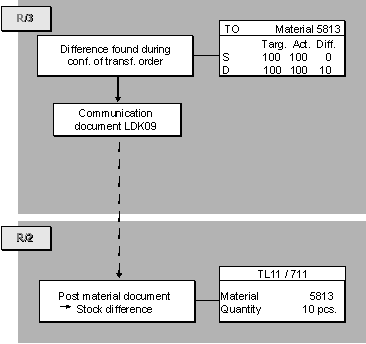
General Process
The general procedure is as follows:
If data is transferred on a cumulative basis, the quants are first posted to the interim storage area for differences. In this case, you need to start a report that reads the interim storage quants and creates a communication document.
Technical Process in R/3
If a difference is entered during the confirmation of a transfer order, the difference data is recorded in the transfer order and then needs to be transmitted to the R/2 System.
Determining the Receiver
The system determines the communication number for the warehouse number, the transaction, and the movement type.
Using the communication number, the system determines the queue ID under which the receiver is defined.
Creating the Communication Document
A communication record LDK09 (record type WM09) is created from the difference item for the difference posting.
Difference for an R/2
® R/3 TransactionIf the difference is recorded for a transaction that is posted first in Inventory Management and then in Warehouse Management, the communication document only contains communication records of the record type WM09.
Difference for an R/3
® R/2 TransactionIf the difference is recorded for a transaction that is posted first in Warehouse Management and then in Inventory Management, the communication record for transmitting the difference data is an integral part of the communication document that is created when the transfer order is being confirmed.
The communication document in this case consists of communication records of different record types:
Transmitting the Communication Document
The communication document is placed into the queue and transmitted to R/2 either automatically or manually.
No Interim Storage Area for Differences
Since the difference is transferred to Inventory Management directly, no quant is posted to the interim storage area for differences.
Technical Process in R/2
If a communication document with a communication record WM09 is transmitted to R/2, this initiates the following actions in the R/2 System:
Receiving the Communication Document
At the same time, the system makes an entry in the status record LDK00, which is used for managing the communication document.
No Interim Storage Posting
When the material document is being created, the system determines that the document is created by the R/3 Warehouse Management component. No communication document is created and, therefore, no quant posted to the interim storage area for differences.
Differences in Source Storage Bin for Transmissions to R/2
However, for goods receipts (for example, from Production Planning), it is generally better to establish the quantity actually produced by adjusting the stock quantities in the source storage bin. This is necessary because the exact quantity to be produced is not always known. This often results in partial pallets.
Using the SAP WM component, It is possible to transmit the actual quantity to the R/2 System, that is, the target quantity is corrected to the actual quantity based on the difference in the source storage bin.
This type of transmission to the R/2 System must be activated as an individual processing control based on the movement type. For processing in R/3, activate the Field Diff.in source bin under Individual processing controls for R/3 to R/2 Communication in the Define decentralized link to R/2 section of the Warehouse Management IMG.