 Stock Transfers from R/3 to R/2
Stock Transfers from R/3 to R/2
R/3 as the Leading System
The section
R/2 ® R/3 Processes is based on the assumption that the R/2 Inventory Management (IM) component is the leading system for posting a goods movement, that is, that each goods movement is posted first in IM, and then a transfer order is created in WM.However, it is also possible to create the transfer order first in WM and then to execute the stock posting in R/2 afterwards.
Organizational factors can play a role in the decision to have WM as the leading component for certain transactions.

If a company runs on a 24-hour operation basis, finished goods need to be taken from the production area and placed into storage in the warehouse. Since the host system is available for limited time periods only, such goods movements are first entered in WM. As soon as the Host system is active again, the goods movements are posted subsequently in IM. This takes place automatically via the interface.
No Checks
When goods movements are entered in WM, the system does not check the posting against data that are stored in the main system.
For this reason, certain transactions, such as goods receipts for purchase orders, should be posted in IM first so that data checks in R/2 can take place (for example, checking the goods receipt quantity against the ordered quantity).
Material Availability
A goods movement is taken into account by the Material Requirements Planning department only after the RM document has been posted in Inventory Management. If there is a considerable time delay between the LVS posting and the RM posting, you must bear in mind that the material availability as stated by the system may deviate from the actual availability of the material.
General Process: Single Data Transfer
If a goods movement is posted first in Warehouse Management and then in Inventory Management, the process is as follows:
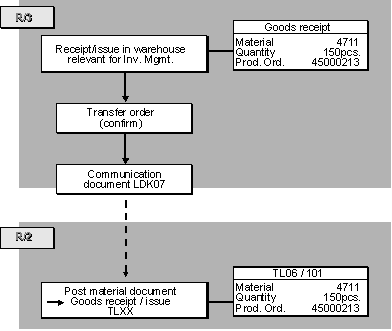
General Process: Cumulative Data Transfer
If you want to have the transfer data transmitted on a cumulative basis, the procedure is as follows:
Technical Process in R/3
If you post a goods movement in Warehouse Management first and then in Inventory Management, the communication process is as follows:
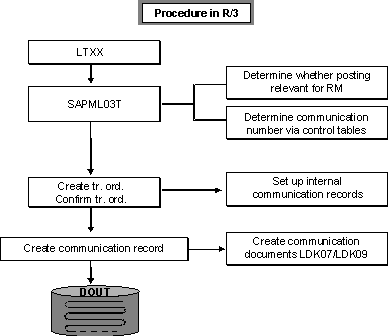
Creating a Transfer Order
When a transfer order is generated (without confirmation), the system posts quants to the interim storage area for each transfer order item. For example, the quant for the source item is posted to the interim storage area for goods receipts.
At this point, no communication takes place because the transfer order must be confirmed first.
Checking Communication Relevance
During confirmation (or creation of transfer orders with simultaneous confirmation), the system checks on the basis of the movement type whether the stock placement or stock removal concerned is relevant for Inventory Management and whether the data should be transferred on a single or cumulative basis.
Creating the Communication Document
The system creates a communication document of the type LDK07 from the data to be transmitted.
Single Data Transfer
The system creates a communication record of the record type WM07 for each transfer order item. This record contains both the transfer order header data as well as the item data (interim storage item).
If an interim storage quant was posted when the transfer order was created, the system clears this quant during the confirmation procedure.
No quant is posted to the interim storage area because the goods transfer data (material, quantity, and so on) are transmitted to the R/2 System via the communication document.
Cumulative Data Transfer
When a transfer order is created, the system automatically posts quants to the interim storage area. During the confirmation procedure, these quants are not cleared and the system does not create a communication document right away.
In order to create the communication document, you need to initiate a report that reads the interim storage quants and creates a communication record for each material. Only then will the interim storage quants be cleared.
Determining the Receiver
If a communication process is to take place, the system determines the communication number for the respective warehouse number, for transaction activity key 001, and for the movement type in a control table (Control of Single Transactions).
Using the communication number, the system finds the queue ID in another control table (Communication Numbers). The receiver is defined here.
Transmitting the Communication Document
The communication document is placed into the queue and transmitted to the R/2 System either automatically or manually.
Technical Process in R/2
If a communication document of the type LDK07 is sent to the R/2 System, this initiates the following actions in R/2:
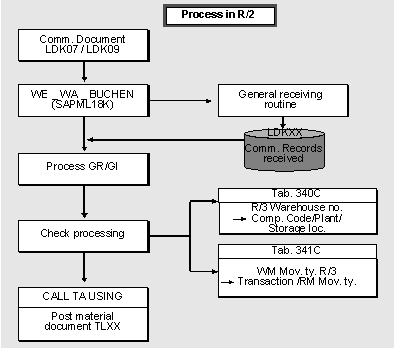
Receiving the Communication Document
At the same time, the system makes an entry in the status record LDK00, which is used to manage the communication document.
The R/3 fields of the communication document are converted to R/2 format.
An LDK00 record is created and the goods movement is posted in the R/2 System.
No Interim Storage Posting
When the material document is created, the system determines that the material document was generated by the R/3 Warehouse Management component and does not create a communication document. As a result, neither an interim storage quant nor a transfer requirement is created in Warehouse Management.