The Warehouse Management (WM) application interface to the Quality Management (QM) component allows warehouse administrators to manage and track inspection lots that are stored in the warehouse.
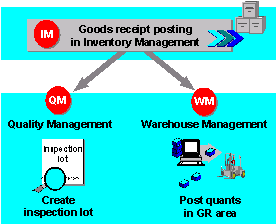
The primary processes in the interface between WM and QM function as follows:
- Based on the inspection data in the QM view of the material master, the system can create an inspection lot when you post a goods receipt in the Inventory Management (IM) component. The QM inspection data also determines whether an inspection lot is to be inspected with an inspection plan and determines the quantity of the material that is to be selected as an inspection sample.
- In WM, the normal process takes place for the goods receipt posting in IM — the system creates a quant in the interim storage area and, depending upon the system definition, a transfer requirement in WM. An inspection lot number is noted in the quant in the interim storage area and in the transfer requirement. The system stores the interim storage bin coordinates in the inspection lot itself.
- If a usage decision has not yet been made for the inspection lot, the system displays a dialog box to inform you that a sample quantity exists when you process the transfer requirement for the goods receipt in WM. (This dialog box can also be processed in the background.)
- In QM, a usage decision is made after the inspection has been completed. The resulting postings are passed on via the IM component to WM and there they initiate stock removals or posting changes. For more detailed information, refer to the section
 How the QM Interface Process Works