 2-Step Picking
2-Step Picking
Use
For 2-step picking, the picking process is divided into 2 separate steps. In the first step, you pick the entire quantity of materials need to fill requests (several deliveries or transfer requirements). During the second step, you divide up the materials and allocate them to match the corresponding requirements.
Two-step picking can be used to pick materials for both deliveries and transfer requirements.
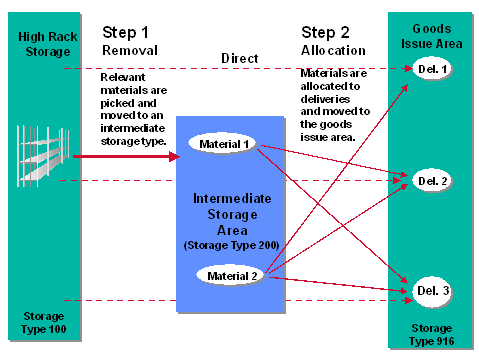
Two-step picking includes three different processes:
During the removal process, the cumulative quantity of each material required in reference documents (deliveries or transfer requirements) is picked from bulk or random storage and moved to an intermediate storage area.
During the allocation process, the cumulative quantities of materials are divided up to match the individual requirements in the reference documents and distributed to the appropriate goods issue area.
Direct picking takes place when two-step picking is material-dependent (defined in the material master). In other words, part of the material is picked using the 2-step method and part of the material is picked directly from the warehouse.
Prerequisites
Before using the 2-step picking function, you must activate it and define control parameters in the Customizing application.
To activate 2-step picking for deliveries, see the Warehouse Management IMG documentation under Interfaces ® Shipping ® 2-step picking.
To activate 2-step picking for transfer requirements, you define control data under Activities ® Transfers ® Set up 2-step picking for transfer requirements.
Features