 Analyzing Problems With External Commands and Programs
Analyzing Problems With External Commands and Programs
Purpose
The following R/3 system components play a part in the processing of external programs in a job:
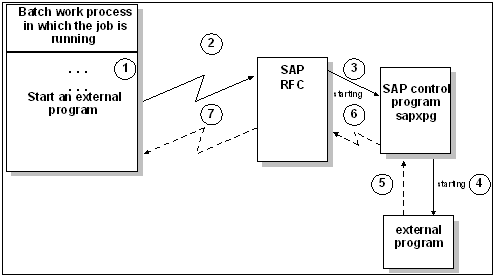
This figure illustrates how the control program is started from a background work process via RFC and how the control program calls the external program itself. It also shows how the control program sends a message back to the application server via RFC.
The following problems can arise when processing external programs in a job:
Process Flow
These problems can be analyzed as follows
Check that the target system is set up correctly for running external commands and programs. See
If the problem has not yet been solved, then you should switch on the trace for the external program. When you are scheduling an external program in the dialog (Transaction SM36 / SM37), you can turn on the SAPXPG trace with for a particular job step with trace option in the job step Control flags. You can also turn on the SAPXPG trace in these additional ways, without modifying the job step definition:
sapxpg_trace=<trace level>
where trace level is 1 , 2 , or 3 . 3 is the most detailed tracing. 0 turns tracing off again.The trace records are written in the trace files listed above.
All of these options turn on SAPXPG’s tracing, but have no effect on any tracing facility at the operating-system level or in the external program.
If you use the function module JOB_SUBMIT to schedule a job step, then you must make the following parameter setting: EXTPGM_SET_TRACE_ON = ‘X’
This has the effect of creating the following trace files in the home directory of the gateway ID on the host on which the external program is to be executed:
Check both of these trace files for error messages. You may also find error messages in the gateway trace file dev_rd and in the system log on the host on which the job was started.
See also: