

Start Processing
When the Windows NT system is booted, the R/3 service (
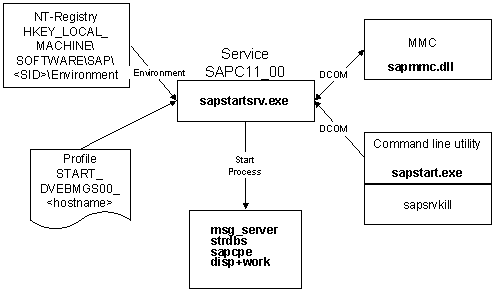
SAP<SAPSID>_<Instance number> , e.g. SAPC11_00 ) is always started automatically. The service evaluates entries from the Windows NT Start Profile and reads the necessary environment variables from the registry.You can start the R/3 processes using the Microsoft Management Console (MMC). To do this, select an instance and choose Start from the context menu. For more information, see
DCOM communication is set up with the R/3 service and messages for starting the appropriate R/3 instance are sent to the service. The R/3 service interprets the Windows NT start profile (see the section Evaluating the start profile below) and starts the processes the instance consists of (the processes are started by the program
sapstartsrv.exe ).The message for starting the appropriate instance can also be issued by the command line program
sapstart.exe .The following diagram illustrates the interaction of the individual processes in the start procedure:
See also:
Registry Entries Windows NT Start Profile SAP Service Manager Windows NT: R/3 Program OverviewEvaluating the Start Profile
When you start an instance, the R/3 service executes all commands in the Windows NT start profile that have an
Execute_ statement.The R/3 service then starts the processes of the R/3 instance in the order in which the
Start_Program_ statements are listed in the profile.
It is possible to set the parameter
Shutdown Processing
The R/3 system can be stopped as follows:
The R/3 service waits for a stop message from the MMC or a command line program (for example,
From the list of services, select the service of the R/3 instance (

The database is not stopped in this shutdown procedure.
Evaluating the Start Profile
The R/3 service executes stop commands for the R/3 processes it has started itself. Only those processes started with
Start_Program_ statements are stopped. Processes started with Execute_ statements are not taken into account.
The R/3 service logs the start and shutdown of the R/3 System. You can display this log, for example, from the SAP Service Manager. For further information on error situations, see
The R/3 System can also be started and stopped using appropriate scripts.
The processes under which these scripts are started (for example,
at schedule service) may not be started under the user ADMINISTRATOR or with the SYSTEM Account. In the following you will find examples of these scripts. The variables (name of the R/3 System, names of the instances…) still need to be adapted to the specific R/3 System: Example: Script for Starting the R/3 System Example: Script for Stopping the R/3 SystemExample: Script Using DCOM Interface
See also:
Starting an R/3 System: Windows NT Stopping an R/3 System: Windows NT R/3 System on Windows NT: Problem Analysis