Funds Management: Budget Planning in Euro (FI-FM)
Funds Management: Budget Planning in Euro (FI-FM)
Purpose
As part of local currency changeover to euro, you can maintain a particular euro FM area for
the component Funds Management (FI-FM), in which you execute the budget planning in euro for the fiscal year in which the currency changeover to euro is planned in the system.To achieve budget planning in euro on the one hand and to manage the current business processed at the same time on the other, is a special case requiring a special system maintenance. This is because the simultaneous implementation of several local currencies per FM area is not supported, but both the general business processes and the budget planning in the local currency are to be executed.
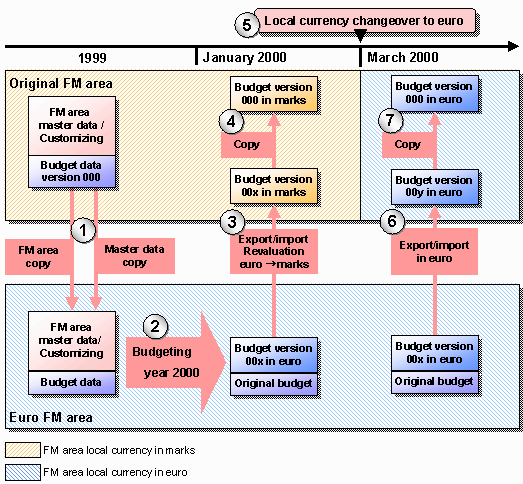
In the changeover phase, it is therefore necessary to maintain a second identical FM area (to be named euro FM area in the following) to be managed in euro, parallel to the existing FM area (to be named original FM area) that is managed in the original FM area currency.
While you continue the budget execution in the original local currency, the euro FM area fulfills the function of being able to create budget planning for the year of the local currency changeover in euro. At the start of the new fiscal year (year of the local currency changeover), you transfer the budget data created in the euro FM area into the original FM area. As long as the original FM area is managed in the original local currency up to local currency changeover, an automatic revaluation from euro into the original FM area currency takes place when you import the budget data. You execute the import of the budget version again immediately after the euro changeover and so you correct the rounding differences conditioned by the revaluation. After the changeover phase, you will again continue working exclusively in the original FM area and will deactivate the euro FM area.
Prerequisites
Process Flow
The following presents the functional process flow of the local currency changeover with an original FM area and the assigned euro FM area.
In this example the following data applies:
In the fiscal year 1999 |
In the fiscal year 2000 |
|
|

After creating the euro FM areas, execute master data changes exclusively in the original FM area and update the changes in the euro FM area, using program Update master data in the euro FM area.
For more information see the Implementation Guide under Cross-Application Components ® European Monetary Union: Euro ® Functions and Settings for the Dual Currency Phase ® Financial Accounting ® Funds Management: Budgeting in Euro: Budget planning in euro in the sections:
For more information see the Implementation Guide under Cross-Application Components ® European Monetary Union: Euro ® Functions and Settings for the Dual Currency Phase ® Financial Accounting ® Funds Management: Budgeting in Euro: Budget planning in euro in the sections:
For more information, see
 Copy Budget Versions.
 For information on the local currency conversion, see
Local Currency Changeover.
Since no currency revaluation takes place (both FM areas are managed in euro) the rounding differences connected to the conversion are no longer given.
For more information see the Implementation Guide under Cross-Application Components ® European Monetary Union: Euro ® Functions and Settings for the Dual Currency Phase ® Financial Accounting ® Funds Management: Budgeting in Euro: Budget planning in euro in the sections:
Local currency changeover using euro FM area