
Validation Checks
Validation checks of individual FS data entered are not performed immediately during entry, instead you must call them up afterwards. You must define validation checks specifically, since the system gives you a free choice of item numbers, and many validation checks can and must be shown as relationships between item numbers. You manage the validation status, that is, the possible number of errors, in Status Management. You can only block input activities after the validation report has run and the error count 0 appears in Status Management under
Status overview.Defining Validation Checks
Validation checks are defined in the Implementation Guide in the section
Individual Financial Statement Data ® Validation Checks. The checks are assigned to individual groups. A rule can span multiple lines.The following validation categories exist:
You should define an arithmetic expression using item numbers, for example the sum or difference of several items, followed by a relational operator (=<,>). There should be another item
– V for an affiliated company,
– J for acquisition year and
– W for currency.
The letters B, V, J, and W must be capitalized. The +/- sign of an item or transaction type according to Item Type Maintenance / Transaction Type Maintenance is automatically taken into account, so you can enter 0010000000 = 0020000000 right away instead of ‘assets = liabilities’, even though the liability items are stored negatively.
Examples:
0010000000 = 0020000000
0010320000(B=220) = 0030710100 + 0030710200
Irrespective of any possible entries in Validation Maintenance, the system always checks whether totals items in FS Item Maintenance, that is, items that have a totals rule, are in the database and have a value. As no entries are allowed for totals items, an error message appears if totals items carry a value.
The system checks whether the investment item specified in the
rule matches the values from the changes in investments table.Example: 0010330100 = T851
Similarly to changes in investments, the system checks whether the specified equity item matches the corresponding entries in the changes in equity table.
Example: 0020110000 = T871
You can enter a range of item numbers in the FS item
rule . The system checks whether a breakdown for this range has been specified in the specification of the FS chart of accounts. In other words, it checks whether a breakdown actually exists in the database for an FS item which, for instance, is to be broken down by transaction type.Example: (0010300000, 0010399999)
Item values can be compared with constants, for example to find out whether an FS item was in fact reported. The constant must always be specified in the format ‘KXXXXXX’, where the letter K must precede a six-digit number without decimal points (which is interpreted as an amount in cents).
Example: 0020140000 > ‘K000000’
By prefixing an item number with (V), the value of the previous year (for the same period) is taken. If you want to check the percentage variance of an item value compared to the previous year, you may want a note to be displayed, for example, if the variance is more than 20% compared to the previous year.
Example: 0010410000 > (V)0010410000 + '%20'
If you want to calculate a percentage variance with decimal places, you must multiply the previous year’s value by a corresponding constant.
Example: A variance of more than 1.3% compared to the previous year, is shown as follows:
0010410000 > (V)0010410000 * ‘K101300’ / ‘K100000’
Define the corresponding error text or warning message in the entry that follows, in accordance with the item or breakdown
rule . You can also define multiple lines for FS item rule s. The texts are put into Standard Text Maintenance under the application area ‘PL’ in a language-specific manner.Assigning Validation Checks
You can assign any validation groups to the companies in Company Maintenance. You can also define separate rules for checking local and corporate valuation. You can therefore determine which companies should be checked more closely, depending on the input quality of the transferred data.
Executing a Validation Check
The validation check is usually executed in the Consolidation menu
within Status Management or under Indiv.Fin.Stmts. ® Validate:The error log shows the error or warning messages by company, and also the calculation results from the of the item and breakdown
rule s. Furthermore, a message is displayed if the check digit uploaded from PC data entry does not match the re-calculated check digit.The results of the check are recorded in the consolidation status, and the results of checks on the group in the subgroup status. You can only start further actions in Status Management if the check was completed without error.
Within the log, you can use
Report ® Choose to also display the validation rule from Validation Maintenance for each error message. You can use Choose within the validation rule to list the database values for the displayed FS items.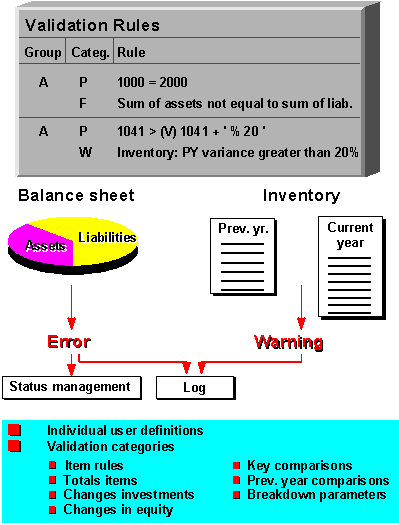
Validation