Defining Data Entry Forms 
Data entry forms are defined in the Implementation Guide in the section Individual Financial Statement Data under either
Transfer from Remote PC Data Entry or Online
Data Entry.A data entry form is made up of a line layout and a column layout. In the line layout you can specify the FS items to be entered for each data entry form and their additional account assignments. The column layout contains the item text, item number and value of the FS items to be entered.
You can define line and column layouts within Data Entry Form Definition in the step Extras.
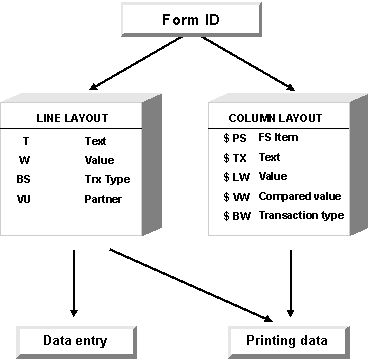
When defining data entry forms, you must set the following parameters:
- Each data entry form must be given an ID of up to 12 characters as well as a title which appears on the printout or during entry.
- You can assign the line layout rule in the field Line layout and the column layout rule in the field Column layout. If a rule has not yet been defined, the system will inform you and allow you to create one.
- The indicator in the field Text type determines whether the short, medium or long texts of FS items should be printed. If text numbers should also be printed, you must select this option.
- If you specify an automatic transaction type then this transaction type appears for entry with all FS items in a line layout rule. It is therefore not necessary to specify the transaction type set nor to define additional sets in the line layout rule. Various data entry forms can also be defined with a single line layout rule when you enter each transaction type. Say, for example, you defined the FS item 30110201 "Gross revenues North America" in a line layout rule without specifying a transaction type set in order to differentiate sales. You could then create various forms with the respective transaction type. This procedure is particularly useful if the transaction types ‘profit centers’ or ‘business segments’ are to be processed.
- To maintain a table using a data entry form, define the ID of the financial reporting table in the Table field.
- To enter quantities, define the unit of measure in which the quantities are to be entered.
- Using the blocking indicator, you can control whether form entry will be:
- generally blocked
- enabled until blocked in Status Management
- enabled until currency translation is blocked in Status Management
- generally enabled
Thus, for example, financial reporting tables can still be entered even if balance sheet and income statement entry has already been blocked.
- FS items may appear for entry in multiple data entry forms. If so, you can either perform another breakdown or enter the item value only. If, in the case of broken down forms, you do not wish the higher-level item value already entered to be altered, select the field Block breakdown.
- If you want a back banner page giving the output date on the last page to be printed for a data entry form, select this option.
- You can also enter data entry forms in group currency by selecting the Group currency field. Otherwise, the entry will be made in local currency.
- An FS item can be defined for breakdown in various line layout rules using various sets (for example: different transaction type sets). Different transaction types can thus be entered for each FS item. By checking the field TTy from set, you can control whether you want transaction types which are already entered, but not defined in the current set, to appear or not:
X
= values should
not appear
_
= values should appear.
- During data entry you can run an additional authorization check by specifying an authorization group in the respective field. Only an authorized user can then enter or change a data entry form.
- For some data entry forms such as balance sheet or income statement, the values entered should produce a balance of zero. If you want this to be a strict prerequisite, that is to say that a form can only be posted if there is a zero balance, you must select the Zero balance field.