You should follow this procedure if
- the companies do not manage their data in the R/2 or R/3 systems
- data cannot be managed using a PC
- data transfer from other systems is not possible.
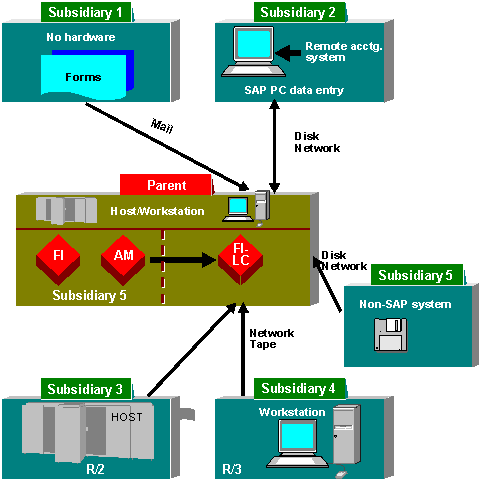
- If the companies are able to manage the individual FS data on PC then you can transfer data into the Consolidation system by means of PC data entry using dBASE or MS Access. The programs for PC data entry are installed on the PC, the individual FS data entered and then transferred into the Consolidation system.
- Plus, for PC data entry you can use the component Interactive Excel. PC data entry with MS ACCESS provides master data and control parameters for creating data entry forms in Interactive Excel. The data entered on the PC is then loaded into MS ACCESS using an ASCII text file and transferred to the Consolidation system.
- For companies which manage their data on an R/3 or R/2 system, individual FS data can be transferred automatically through various interfaces. For further information please refer to the documentation "Preparations for Consolidation in the FI-LC and EC-CS Systems".
- For companies which manage their data in other systems, it is possible to transfer data using PC or UNIX interfaces.
You specify a data transfer method for each company, depending on the situation. An data monitor allows you to easily manage the transfer of individual FS data into the Consolidation system.
The following figure shows the various possible data transfer methods:
Data entry interfaces
