
Versions
Overview
You can use versions to set up your data using various approaches and valuations, and to generate comparative financial statements if desired. For instance, in order to outline a subgroup’s actual and plan data, you can define and compare separate consolidation versions. Also, using different versions, the data can also be based on different control parameters (such as, valuation methods) and/or currency exchange rates.
Thus, by defining separate versions, you can simultaneously generate multiple consolidated financial statements for the same companies and subgroups. For more information see
Setting Up a New Version.Version Maintenance
You can define a version in the Implementation Guide in the section Master Data as a so-called ‘consolidation version’ with a three character ID and a version text.
Set the following parameters in the detail screen:
You should only set this indicator for derived versions and not for the original version. You should under no circumstances copy the data to a version reserved for productive legal financial statements.
In addition to this, you can assign so-called special versions in the detail screen of version maintenance. When you use special versions, you simplify the consolidation versions and above all, minimize redundancy.
Special versions
The financial reporting data (for example equity holdings adjustments, hidden reserves(fair value adjustments), control parameters (for example translation methods, elimination rules) and currency exchange rates are stored in special versions. These special versions are assigned to the consolidation versions. If in merely one of the above mentioned settings, a consolidation version differs from another consolidation version, this variance is stored in a special version and assigned to the corresponding consolidation version.

You want to create consolidation version 001 which differs from consolidation version 002 merely because it uses a different consolidation of investments method. You want to use proportional consolidation for company A in consolidation version 001; and the equity method in consolidation version 002.
In Version Maintenance, you assign the special C/I method version 001 to consolidation version 001; and special version 002 to consolidation version 002. In subgroup maintenance in consolidation version 001 you assign the proportional method to company A; in consolidation version 002, you assign the equity method. The system automatically stores these assignments for the special C/I method versions 001 and 002.
With regard to the other data, both of the consolidation versions are each assigned to the same special versions.
When executing Consolidation of Investments, you specify the consolidation version on the initial screen. The system determines which special versions have been assigned to the consolidation version and, hence, finds the relevant financial reporting data, control parameters and currency rates.
If you do not work with special versions, you will have to define the financial reporting data, control parameters and currency rates specifically for each consolidation version. Since consolidation versions only differ in some settings, a great deal of redundancies will appear.
If you compare the version maintenance of several consolidation versions, you will have an overview as to which settings in any given consolidation version are the same as those in another version, and which are different.
Not all data is stored in special versions. The following data is stored for each consolidation version:
The following illustration helps clarify the concept of versions:
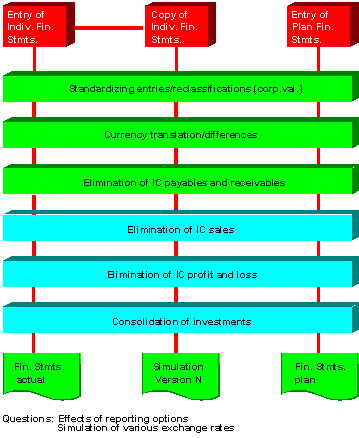
A sample definition of different versions
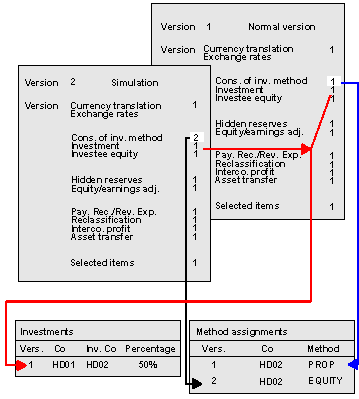
An example of differentiation between special versions