 Configuring an HTTP Content Server for Documents in the Business Workplace
Configuring an HTTP Content Server for Documents in the Business Workplace
Purpose
A class must be created for documents so that they can be stored by the SAP Knowledge Provider. The class SOFFPHIO is assigned to the documents in the Business Workplace in the SAP Knowledge Provider. Storage categories with content repositories are assigned to this class. The content repositories contain the connection data for the relevant storage system, therefore either for the R/3 database or for the HTTP Content Server.
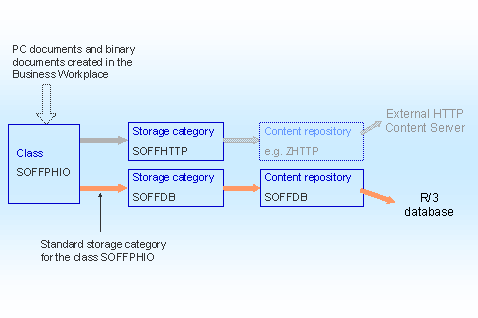
As shown in the graphic, the storage category SOFFDB is assigned by default to the class SOFFPHIO, meaning that the documents are stored in the R/3 database. If you connect an external HTTP Content Server to the SAP Knowledge Provider, you have to make settings so that documents in the Business Workplace can be stored on the external server.
Process Flow
Process Flow |
Procedure |
|
 .
.
|
|
.
|
|
For further information, see
|
Result
After you have made the settings, PC documents and binary documents that have been created in the Business Workplace are stored on the configured content server. The documents that were stored in the Business Workplace before this time remain on the R/3 database. (Therefore the connection to this, the storage category SOFFDB, cannot be changed or deleted.)
 .
. Concepts