 SAP Logon Protocol for External CPI-C Programs
SAP Logon Protocol for External CPI-C Programs
Definition
The information exchanged between an external program and the transaction program (R/2: X1SA, R/3: Dispatcher service) for the logon is determined in the SAP system.
The SAP logon protocol consists of the protocol header (12 bytes) and the actual logon to the SAP System.
Structure
General Protocol Header
The protocol header, the first 12 bytes of the logon sequence, has the following structure:

Protocol header description:
External logon description: |
Description |
RequestID |
Request ID for internal SAP |
Type |
Logon protocol type |
ModeNo |
Mode number within the SAP system |
Reserved |
' ' = Default value |

CONNCPIC1
External Logon to the SAP System
For a correct logon, a CONNECT message must be sent to the transaction program in the desired SAP target system. This logon/start request must always be sent in EBCDIC code.
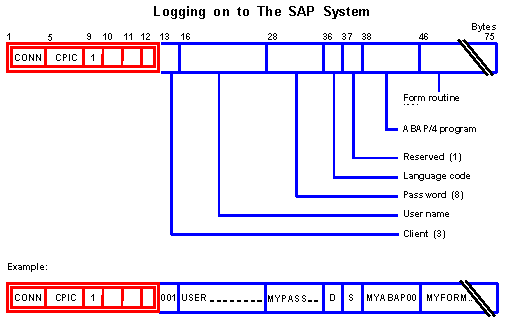
External logon to the SAP system
External logon description: |
Description |
No. of characters |
Example |
Protocol header |
12 |
CONNCPIC1 | |
Client |
Client in the SAP System |
3 |
001 |
User name |
12 |
USER | |
Password |
User password |
8 |
MYPASS |
Language |
For messages from the SAP system |
1 |
D |
Reserved |
Not used for CPI-C |
1 |
|
ABAP program |
Partner program |
08 |
MYABAP00 |
ABAP form |
Subroutine |
30 |
MYFORMABC |
CONNCPIC1 001USER MYPASS D MYABAP00MYFORMABC..

Messages From the SAP System
After a CONNECT request is sent from an external system, the SAP system sends a response. The type of message depends on whether the logon was correct or not.
Positive response
After a connection request (CONN...) is sent with valid logon data, the SAP system returns the request to start CPI-C data transfer. This acknowledgement is always sent in EBCDIC format.
Within the SAP system, the specified ABAP FORM routine has already been activated and performed up to the first RECEIVE statement. This routine then waits for data from the partner.
Positive response: APPCCPIC1
Negative response
After a connection request (CONN...) is sent with invalid logon data, the SAP system termintes the conversation and sends an error message if the request had a valid format.
The negative response from the SAP system consists of the general protocol header beginning with FREE..., an error number and an error text (see the second example in the above illustration).
Negative response:
External logon description: |
Description |
Example |
Protocol header |
(12) |
FREE 1 |
Error number |
SAP error number |
38110 |
Error message |
SAP error text |
ABAP program... not found |