 Example: Budget Structure for Central Budgeting
Example: Budget Structure for Central Budgeting
Defining Commitment Item Groups
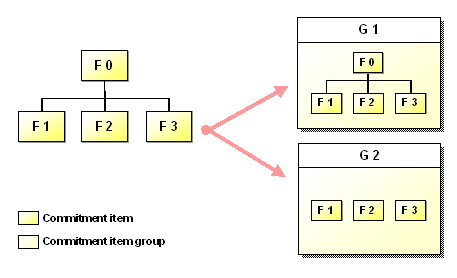
In the first step, you create the commitment item groups. Here Group G1 contains all commitment items, top commitment item F0 as well as subordinate commitment items F1, F2 and F3. Group G2 contains commitment items F1, F2 and F3. All commitment items within the groups are flagged as budget objects.
Defining the Budget Structure Using Commitment Item Groups
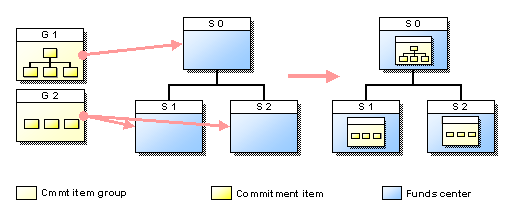
In a second step, you assign the commitment item groups to the funds centers when defining the budget structure.
Here Group G1 is assigned to top funds center S0 and Group G2 is assigned to funds center S0 and subordinate funds centers S1 and S2. When you generate the budget structure, the system then automatically defines the budget objects in the respective funds centers for all commitment items contained in the groups.
Budget Hierarchy: Central Budget Allocation
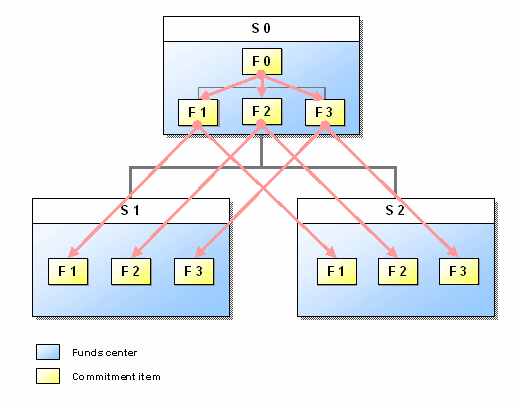
The system sets up the budget hierarchy corresponding to the budget structure. In accordance with group assignment, all commitment items can be budgeted in top funds center S0. Only subordinate commitment items F1, F2 and F3 can be budgeted in the subordinate funds centers.
You can now first distribute the budget from top commitment item F0 to subordinate commitment items F1, F2 and F3 within top funds center S0. You then distribute the budget from subordinate commitment items F1, F2 and F3 to F1, F2 and F3 of subordinate funds centers S1 and S2.