Authorizations
Authorizations
Use
By allocating authorizations, you define which business objects (authorization objects: E.g. funds center, commitment item) your colleagues are allowed to process and which processing functions (activities: e.g. posting) are allowed here.
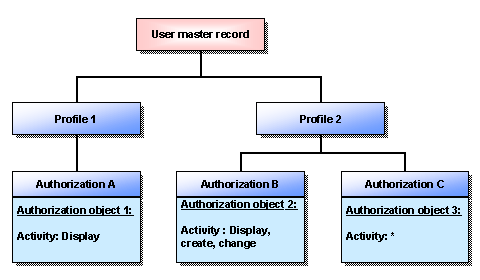
We prescribe authorization objects which make it possible for you to define authorizations. The term "authorization object" covers individual fields with connections between them which the system uses to determine whether a user may carry out a particular action.
You define authorizations by specifying permitted values for the pre-defined objects and determining which activities may be carried out for these objects. You can combine authorizations into profiles. Profiles can, in turn, be combined into collective profiles. One or several profiles are entered in the user master record of a user. Authorizations which are assigned to a user master record, can be copied and assigned to a new user.
Authorizations in the R/3 system
Features
You can use the authorization concept to define authorizations in Funds Management for the following activities:

For an example of how you can use authorizations to control budget allocation, see:
If you carry out an action that affects an object in Funds Management, the systems checks that you have the appropriate authorization.
You can find an example of how the authorization check works in budgeting under
The system we deliver includes an authorization for each authorization object: You can use this authorization, modify it to meet your needs, or create new authorizations.
For more information on allocating authorizations, see:
Activities
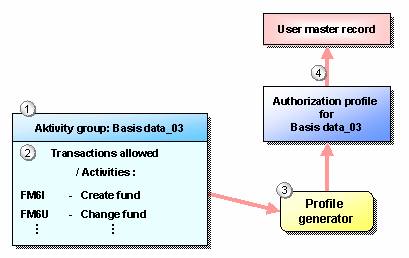
Authorization maintenance with the profile generator
For maintaining authorizations, the user-friendly tool
Profile Generator is available to you. To define an authorization for an employee of your organization, you execute the following steps:·
selecting the respective activities from the Company Menu of your organization·
or entering the Transaction CodesAuthorization maintenance with the profile generator
For more information , see: "Users and Authorizations" in the section Profile Generator of the Basis documentation. Generate profile automatically.
Manual authorization maintenance
Authorizations can also be defined manually without using the profile generator. However, this requires detailed knowledge of the authorization concept in the R/3 system. Because manual authorization maintenance means considerably more work, SAP recommends that you generate authorizations with the profile generator.
Authorizations, which you have generated with the profile generator, can be subsequently modified with the manual authorization maintenance. Conversely, you can use manually created profiles or authorizations supplied by SAP in activity groups.
For more information , see: "Users and Authorizations" in the section Creating and processing profiles manually of the Basis documentation.
See also:
Documentation BC - users and authorizations
IMG documentation Cross-application components ® Document management ® Authorization management
IMG documentation Basis ® System administration ® User and authorization