Payroll integration
Payroll integration
Use
Contributions are taken as a constant value from the payroll infotype Individual Values PF (0279). If other contributions are to be deducted, you must delimit this infotype and enter the required value for the new record. No calculation of contributions takes place in payroll.
Features
In payroll, various contributions are deducted from the employee’s monthly salary. The contributions (for example, pensions) to be posted are read from the report Payroll postings (Report RPUPENC0) from the payroll result. These are then written to the respective individual accounts. Note: You must post the contributions individually. In this way, you can easily run retroactive accounting with changed contributions. In this case, existing contribution postings are cancelled (more exactly: the total of the corresponding postings in the current period), and replaced with a new value. Only then, can you use the PF reports.
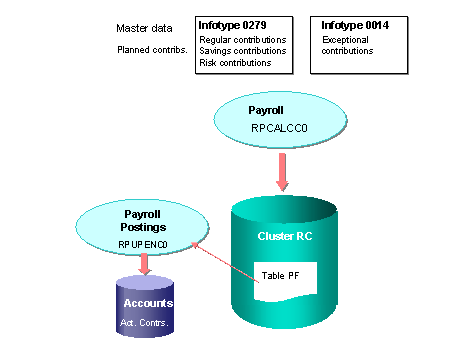
A special case is exceptional contributions in the benefit plan. They are used in financing wage increases. You can process these contributions using the Recurring Payments/Deductions infotype (0014). The number of contributions to be deducted is determined by the time-delimitation of the respective infotype record. Here, it is possible to define a retroactive pay increase for specific time periods.
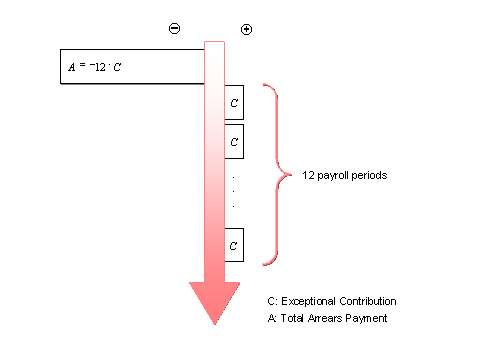
To determine missing exceptional contributions at a later date, you must first post the entire amount of the retroactive indemnity capital payment to the individual account as a negative value for a change in pay. You can then calculate this total amount with the monthly exceptional contributions, which are posted in accordance with the payroll result (as a positive payment).