 SAP Exchange Connector
SAP Exchange Connector
Purpose
The SAP Exchange Connector connects the Microsoft Exchange server to the R/3 System. This enables R/3 applications and R/3 users to send and receive documents to and from an MS Exchange Server mailbox. Documents can also be sent and received in the R/3 System via other connectors that are connected to the MS Exchange server, for example, via the Internet or as a fax. Attachment files (for example, R/3 documents, MS Office documents, fax bitmaps) can be transmitted in both directions.
Integration
The SAP Exchange Connector controls message receipt, message conversion and message transport between the MS Exchange server and
SAPconnect, the R/3 System’s communications interface.Connectors installed on the MS Exchange Server (gateways) can be used from the R/3 System as well, using the SAP Exchange Connector. Examples include:
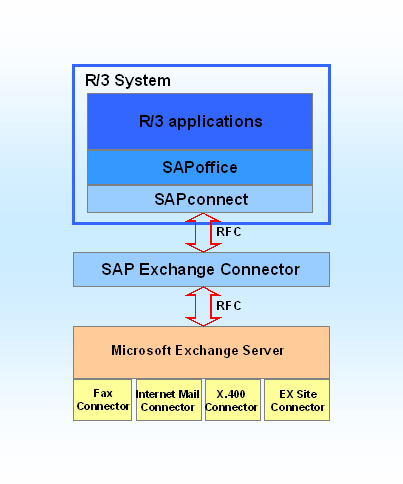
The SAP Exchange Connector exchanges messages with the R/3 communications component SAPconnect via SAP Remote Function Call (RFC). The RFC used here is based on the transport protocol TCP/IP and the CPI/C protocol.
The communication between the SAP Exchange Connector and the MS Exchange Server takes place via RPC mechanisms. The RPCs can be transported locally or via the LAN protocols TCP/IP, NetBEUI, IPX/SPX or Banyan Vines.
The SAP Exchange Connector is made up of three Windows NT system services. These services can be installed either on an MS Exchange Server or, to distribute the load, on a separate MS Windows NT computer. The diagram below illustrates the interaction between the three services:
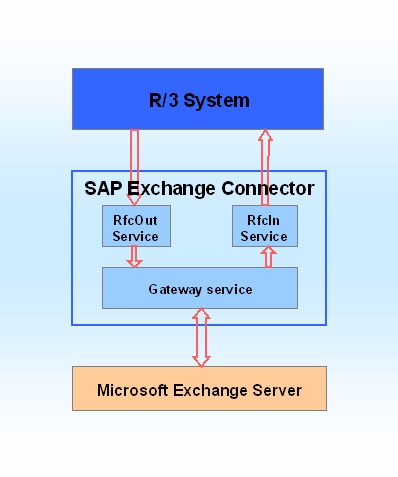
The RfcOut service takes messages from the R/3 System and transfers them via a queue (SXC mailbox Queue out folder in Exchange) to the Gateway service, that then forwards them to the MS Exchange Server MTA. Incoming messages flow via the Gateway service and the Rfc in service, which then forwards messages to the R/3 System.
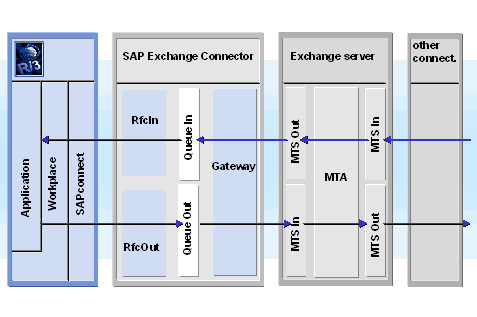
The diagram below shows the flow of internal and external messages in more detail:
Features
You can send messages via the server coupling of R/3 and MS Exchange. Messages can be sent externally and received in the R/3 System via the fax, Internet and X.400 connectors connected to the MS Exchange Server.
R/3 users receive status notifications, such as read or transmission confirmations, for messages that they send via the SAP Exchange Connector. These status notifications are output both for messages sent to Exchange mailboxes and for messages sent via the MS Exchange server connectors to Internet, fax or X.400 addresses.
The SAP Exchange Connector was designed according to the Store & Forward concept. If the connection to the R/3 System or the MS Exchange Server is interrupted, the transfer of messages is triggered repeatedly in a time period that can be set.
To reduce the time and effort required for system maintenance, monitoring and administration of the SAP Exchange Connector is integrated into the Exchange administrator.
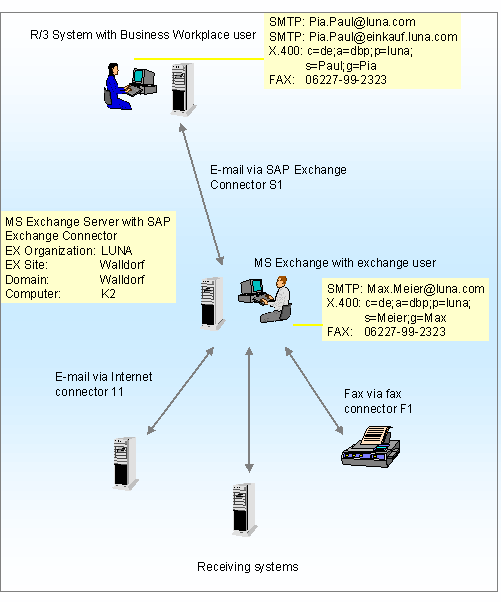
The diagram below shows an example scenario for implementing SAP Exchange Connector:
Using the SAP Exchange Connector, you can also set up a mail system group between SAP Systems and Microsoft Exchange. Microsoft Exchange is the central mail system in this mail system group. All messages sent internally in the SAP System are then transferred to Microsoft Exchange. For more information, see
 A Mail System Group Between an SAP System and an External Mail System.