 Automatic Calculation of the Constant Proportional Factors in Level-By-Level Planning
Automatic Calculation of the Constant Proportional Factors in Level-By-Level Planning
In level-by-level planning, disaggregation from one level to the next¾insofar as it is carried out at all ¾is carried out separately for each level and is based on the proportional factors in the planning hierarchy. These proportional factors describe the relationship of characteristic values on adjacent levels.
For a brief outline of aggregation and disaggregation, see
Concepts of Aggregation and Disaggregation.You can have the system calculate the proportional factors on the basis of any version of an information structure’s data. This will normally be the version containing actual data, version 000. However, should you wish to use planning data as a basis for this calculation, you simply enter the appropriate planning version in the Version field.
This calculation is performed with reference to a specified time period and key figure.
If you carry out this function in the planning hierarchy, it is single-level; that is, the system calculates proportional factors for the planning level you are currently maintaining. Choose Edit
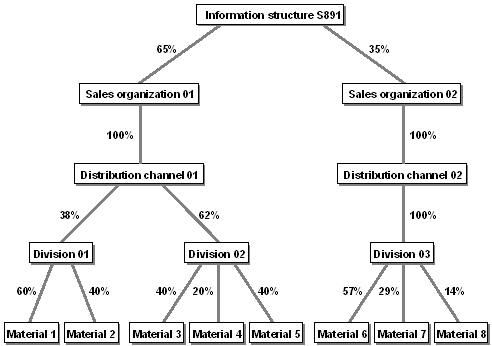
® Calculate proportions.The system totals the data of the characteristic values at the lowest level in the planning hierarchy and cumulates it "bottom-up" through the planning hierarchy until it reaches the current planning level. It then divides the key figure for each characteristic value at this level by the total key figure. This gives the proportional factor of each characteristic value.
To have the system calculate the proportional factors at more than one level in the planning hierarchy, you choose Master data ® Calculate proportions ® Using actual data from the flexible planning menu. On the selection screen, you enter your selection criteria including the desired characteristic values. The function is then carried out for the specified planning level (given by the characteristic values) as well as all planning levels beneath it. Thus, if you want proportional factors to be calculated for all planning levels in the planning hierarchy, you leave the characteristic fields blank. In addition, you specify in the Operation field whether you want the calculation to be single-level or multi-level. The calculation method is as described in the previous paragraph.
The function Goto ® Select details in the planning table gives you a quick overview of the proportional factors.
Example of Proportional Factors Calculated for a Planning Hierarchy
See also:
Ways to Aggregate and Disaggregate in Level-By-Level Planning Calculating the Proportional Factors Automatically"Proportional Factors" in
Planning Hierarchy Maintenance.