Line Layout Variants
Line Layout Variants
You can define several variants for line layout. When displaying a document, you can switch between the variants. Choose Settings
® Line layout from the document overview.
Using a variant, you can display the line item, the account number and name, and the posting amount. Using a different variant, you can display additional information such as tax information or the cost center.
The standard system then offers the following line layout variants:
You can change these variants or add new ones in Customizing.
If you define your own variants, you need to carry out the following for each variant:
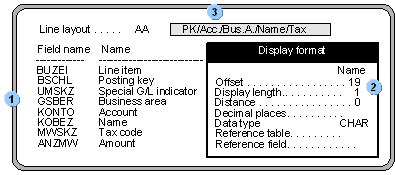

If the names or column headings for a variant are missing, the system displays a message.
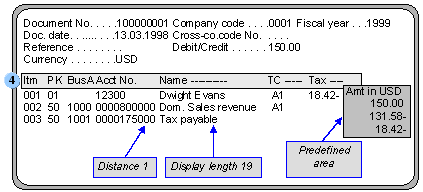
The following figure shows document information displayed using the account/name line layout. The column headings for the account name are displayed according to the definition with distance 1 and display length 19. The column heading and the corresponding display area for the amount are specified by the system. You cannot define the area.