 Financial Statement Versions with Group Account Numbers
Use
You can define a financial statement version by assigning the group account numbers to the items. This gives you the option of creating group financial statements.
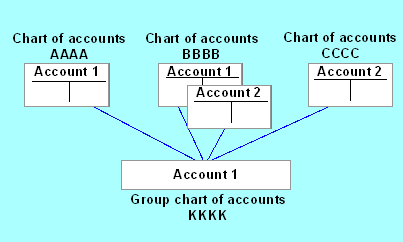
The group account number allows you to group together all the accounts from different charts of accounts which are to be displayed under a certain financial statement item. Using the group account number therefore assigns a group of accounts to the same item.
Prerequisites
The following prerequisites must be fulfilled in order for you to be able to use group account numbers:
- You must define a group chart of accounts containing the required group accounts. These accounts must be created in the chart of accounts area, but not in the company code-specific area.
- In the chart of accounts index, you must enter the required group chart of accounts for each of the individual charts of accounts for which you want to define a common financial statement version.
- You enter the group account number you have selected in the master records of the G/L accounts. By using the same group account number, you group together the accounts you want to display under one particular item.
Features
When assigning the group account number, please note the following:
- Accounts of the same type may be stored under different numbers in different charts of accounts. You can group these accounts together under a single group account number.
- Accounts with the same account number may actually be different types of account in different charts of accounts. You can assign these accounts to different group account numbers.
In the financial statements, the system displays the group account number.