 Mandatory Assignment of Measures and Appropriation Requests to Programs
Mandatory Assignment of Measures and Appropriation Requests to Programs
Use
When you use investment programs, you normally want to guarantee that all newly created measures and appropriation requests are assigned to investment programs. Therefore, you can make this assignment mandatory in newly created measures and appropriation requests.
Features
Assignment by Means of Screen Layout Control
Normally you assign an appropriation request to an investment program position in the appropriation request master data (on the Control data tab page). The program position field appears in the screen layout control of the appropriation request, and can be designated as a required entry field there. If you make this a required entry field in Customizing for Investment Management, you guarantee that the appropriation request is always assigned to a program position (Choose Appropriation Requests ® Master Data ® Control Data ® Define Screen Layout for Appropriation Requests). This option is currently limited to appropriation requests only.
Assignment by Means of Budget Profile
There is another option for ensuring that both measures and appropriation requests are assigned to program positions. You can enter a program type for investment programs in the budget profile of the measure or appropriation request. The results of making this entry are as follows:
You assign a budget profile to an investment measure either in the project profile or in the order type.
Example
The following graphic shows the function of the budget profile in controlling the assignment of measures to program positions. You cannot budget Project 1 unless it is assigned to an investment program that has program type 0001. In addition, you can only budget it using program position 2 (overall budget).
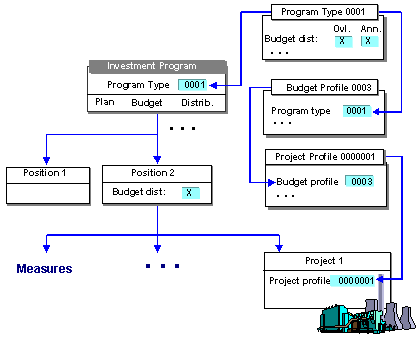
Control Parameters for the Assignment to an Investment Program