Working with Financial Documents
Working with Financial Documents
Purpose
This process helps ensure that the export transaction meets the terms of its associated financial document. Failing to meet the financial document’s terms can result in delayed payment or even loss of payment to the exporter.
Prerequisites
To use financial documents in R/3, you must first maintain financial document settings in Customizing for Sales and Distribution. Choose Foreign Trade/Customs ® Documentary Payments.
Process Flow

Financial document processes can involve many different banks in different roles. For example, a process could involve different banks as the opening, advising, confirming, and negotiating banks. For simplicity, the process below involves only an opening and advising bank.
In the customer master record, you may have already indicated that sales to this customer require financial documents, or you may have configured the system so that all sales orders require financial documents.
For increased security, you can configure the system to require two authorized users to activate the financial document.
You can assign the financial document to the entire sales order or to selected items in the order.
Depending on how you have set up the customer master record and the document type, the system defaults a payment guarantee procedure in the sales order. You can change the payment guarantee procedure in the sales order if you want to use a procedure other than the default.
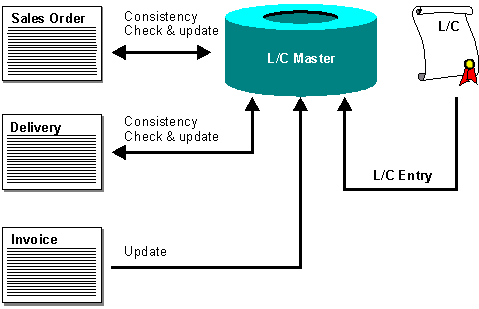
– If there are discrepancies between the sales order and the financial document, the system blocks the sales order. Authorized users may release this block using the Credit Management component.
– If there are no discrepancies, the system updates the financial document master with the sales order amount.
The financial document applies to the entire delivery.
– If, for example, the delivery date is later than the financial document’s validity end date, the system blocks the delivery. Authorized users may release this block using the Credit Management component.
– If no discrepancies exist between the delivery and the financial document, you may post goods issue. The system also updates the financial document master with the delivery amount.
The graphic below illustrates the relationship between the financial document master (represented by "L/C" for "letter of credit) and the sales order, delivery, and invoice.