 Legal Control in Sales Orders
Legal Control in Sales Orders
Use
This function determines whether items in a sales order are permitted to be exported and, if so, whether they require a license. If an item requires a license, the function checks whether a valid license exists. If a valid license does not exist, the system blocks the item.
Integration
The transaction type, which specifies whether the export is permanent or temporary, is stored at the item level. The sales order contains a segment that stores the results of legal control. The system updates the following fields in the segment for each item in the order and for each legal regulation that has to be checked:
The figure below shows the link between the order header, a line item, and an legal control segment.
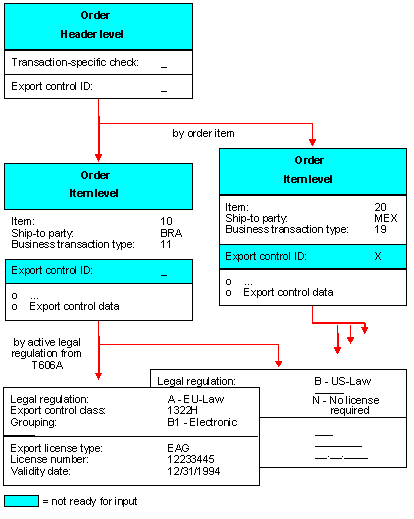
During legal control, the required delivery date is entered at the header level for the check.
You can perform a manual check at the header level based on your knowledge of a particular transaction. However, proper legal control must be carried out at the item level. This is necessary because the ship-to party can be different for each item in the order. Furthermore, it is possible that the items could be destined for different countries.

If the order is blocked because of the check, it should not be possible to deliver it.
In addition to system status FTC 1 - 5, which duplicates the results of the results of the legal control check, you can (with the user status) set a user-specific or transaction-specific export control indicator.
This is how the results of the manual check for the export license carried out by the employee responsible is stored. This indicator is supplementary to legal control. The user status FREE can be deactivated by the FTC 1 - 5 system status. The ‘worst case’ is adopted in this case.
Status allows you to document, from the user view the current processing state of an object (the order) in the form of flags (status). The current state of the object (the combination of the active statuses) determines which actions (business transactions) can be carried out for the object.
Status can control which transactions can be carried out for an object. Each status can either:
When a transaction (such as the creation of a delivery) is made, a check determines what status is set for the object (for example, the order). The transaction is only permitted if none of the statuses set (neither FTC5 nor the user status) disallow it.
The special features of the user status are:
The user status has the following structure:
For example, create sales order (no influence - permitted - permitted -with warning - disallowed)
The FOREIGN TRADE CHECK - STATUS status profile is activated in the sales document types by an active export license check. The FOREIGN user status profile maintains, for example, the following transactions for the SALES ORDER ITEM object category:
For example, with status ‘AHPJ’ (check according to export law (transaction-specific) O.K.), the transaction characteristics are such that it is not possible to block them. A manual transaction check is performed and classified as ‘O.K.’. With status ‘AHPN’ (check according to export law (transaction-specific) incorrect), the transaction characteristics are such that the various transactions (such as the delivery) issue a warning.
For certain legal regulations, such as the German AWV (Foreign Trade Regulation), a corresponding transaction indicator is necessary.
See also
For more information on legal control in SD documents, see
Legal Control in Deliveries.