 Step 3: Running Delete Programs
Step 3: Running Delete Programs
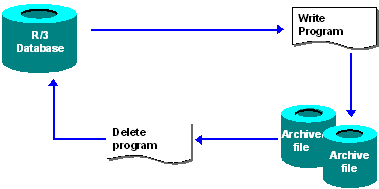
After closing the first archive file, the archive management system creates a new archive file and continues with the archiving process. While this happens, another program reads the archived data from the completed archive file and deletes it from the database. This procedure guarantees that only data that has been correctly saved in the archive file is deleted from the database.

If you do not carry out deletion until after the data has been stored, you can make a setting in Archiving Object-Specific Customizing so that the system will read archive files the from the storage system during deletion. In this way, you can detect errors in good time which might arise when transferring or saving the archive files in the storage system.
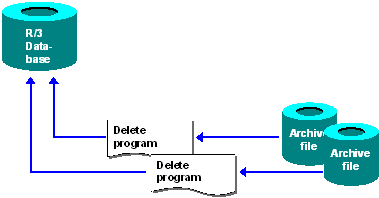
When the last archive file is closed, a delete program is also executed for this file. The graphic shows that several delete programs are running simultaneously. Because the archiving program makes no changes in the database, it creates new archive files faster than the delete programs can process them. This decreases the total archiving runtime because the database is used more efficiently.
Delete Run Followed by Event
After all archive files have been completely created for an archiving session, the ADK triggers the system event SAP_ARCHIVING_DELETE_FINISHED. By reacting to this system event, you have the option of scheduling archiving jobs automatically. This includes the rebuilding of indexes or input help, archive file backup before deletion, and so on. The event parameter is the number of the archive session.
You can define new jobs in transaction SM36. You maintain events in transaction SM62.
You can also have event-controlled delete runs started automatically. You can define the event that triggers the delete program in the group box Settings for the Delete Program in Archiving Object Specific Customizing.
For more information, see
Deleting Data from the Database.